Photography

How to: Spotlight a City Trip

London, Paris, Rome, New York. City trips offer you a unique opportunity to explore the culture and culinary delicacies of a country. In addition to the magnificent sights, the parks and cafés, it is the charm and the characteristics of a city that make a trip like this so interesting. Of course, the camera cannot be missing to capture and share the flair and vibrancy of the city. Here are our tips to make your pictures stand out from all the others.

The ‘Blue Hour’

After a stunning sunset, the sky will appear in a deep blue color and enters the ‘Blue Hour’. Historic monuments which are diffusely illuminated, buildings or the city in general will be lit up with all different kinds of lights with different color temperatures, creating a magical scenery. Unfortunately, due to different seasons, the Blue Hour can differ from season to season. Therefore, planning is key! Find out about suitable sights in advance and put yourself in a good place to get the most out of the Blue Hour.

Change Perspectives

The Eiffel Tower in Paris, the Tower Bridge in London or the TV Tower in Berlin there are hundreds of images from all three sights. All look basically the same because they are usually captured from similar angles. Now it is time to mix it up a bit. Have a more detailed look at known monuments and think about interesting details you may see or objects surrounding the main motif which might support the visual appearance. Having a look at pictures online and getting inspired to develop these photographic ideas further can help to explore new perspectives as well.

Skillfully Avoid Mistakes

© Omar Alnahdi

Taking a picture of a tower which looks like falling behind on the actual image or similar. So called ‘falling lines’ is the unpleasant effect when the camera is not aligned parallelly with the motif and the object has parallel edges. The slight inclination causes ‘falling lines’ which can be bothersome. Consequently, it is important to choose the angle carefully to avoid this mistake. If that is not possible, finding a suitable location and then using the falling lines creatively is essential. For example, photographing a skyscraper steep from below, which will emphasize the high of the building. This makes your photo more dynamic and transforms it into an eye-catcher.

Blur People

Visiting sights in different cities always leads to crowds of people standing in front of one building or statue, which makes taking great shots almost impossible. In order to still have the motif playing the main role, there are two options to do so. Either visiting a sight early in the morning or late at night, or reach into the bag of tricks. With an exposure time of 1/15s or longer, motion blurs are created. This blurs the masses of tourists and puts the building back in the foreground. Very important: Use a tripod.

Capture The Skyline

© Elia Locardi

Let’s be real. We all LOVE it. A city’s skyline can be magical for most of us. From an elevated viewing point, it is possible to experience a breathtaking sea of lights, which account for a photo that is rich in contrast. Depending on the location, there are some things to think about. When photographing the skyline through a window, it is important to stand as close as possible to the window to avoid mirroring reflections. Using the flash in that occasion can cause a white dot on the window and should be turned off. Making use of a tripod helps to take sharp photos.

Now you are prepared for the next city trip and awesome memories captured through your camera.

Header Image © Daniel Malikyar
Profumo Di Vita

The “Profumo di Vita #neldirittodelbambino” project was born in 2017 from the collaboration between the Legal@rte Association, made up of members of the State Police, and X-Photographer Elena Givone, with the support of FUJIFILM Italia.

Elena Givone makes her shots available to raise awareness on the theme of “child-assisted violence”. A hidden phenomenon, that of children forced to witness violence between adults, which can lead to physical and psychological problems in children.
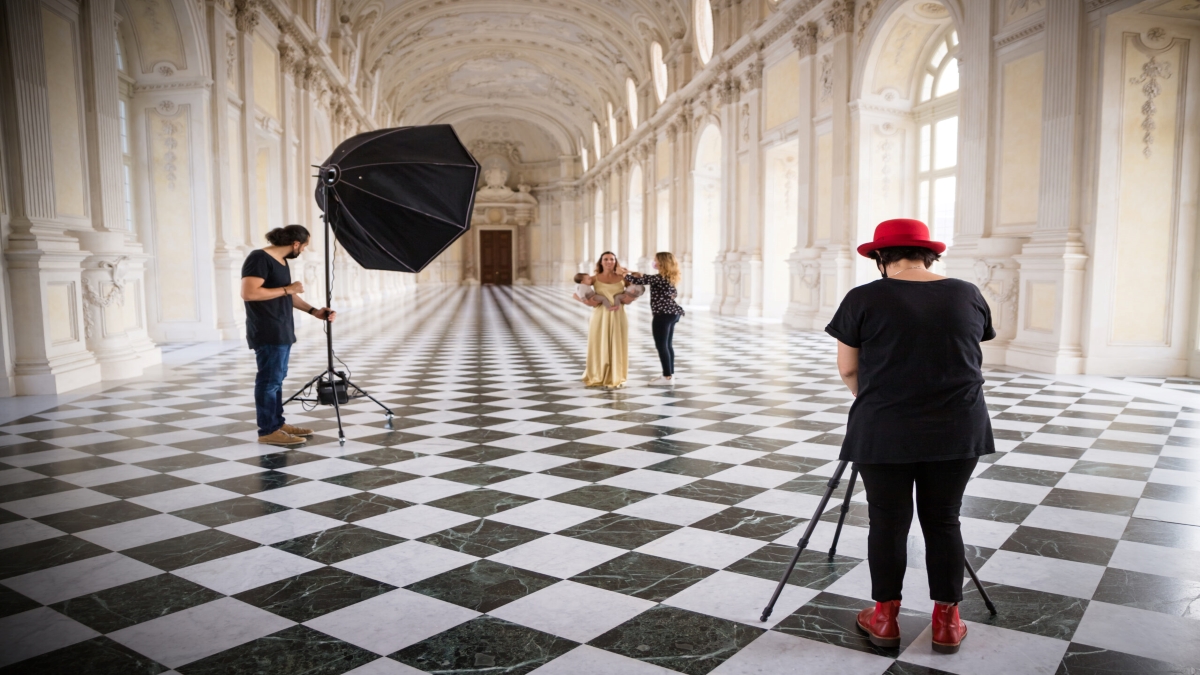
Thus was born the 2022 edition of the Profumo di Vita calendar #neldirittodelbambino. Women and mothers posed at the Reggia di Venaria.

All calendar and exhibition images were shot with the FUJIFILM Large Format GFX100S. The exhibition was printed on FUJIFILM Original Photo Paper – Fujicolor Crystal Archive Professional VELVET and took place from December 16 to January 16, 2022.

Spring Season is here

Winter is officially over. At least here in Europe. Today, March 20, 2022, marks the official beginning of Spring. Nonetheless, the actual meteorologic beginning of Spring was already at the beginning of March.

Photo by Luca Bracali

This year, all seasons start at the beginning of the month in which the season starts from an astrological perspective. Subsequently, all season last exactly three months. A reason for that is the climate data, which is only available on a monthly basis. However, the start of spring season according to the calendar in that matter is today. Let’s get ready for longer nights spent outside and more stunning sunsets.

Spring also means cherry blossom. We, as a company with its global Headquarters in Japan, are huge fans of cherry blossom season. How couldn’t we? All the cherry trees are starting to blossom between the middle of March and the early beginning of May. In Japan, it already started on March 14 when the first flowers started opening their blooms. Such a beautiful scenery with all the trees lighting up in their rose and white floral dress.

Header image by Shigeki Yamashita 

How to: Photos in Bad Weather

Dreary clouds, rain, fog and wind are definitely not ideal for an outdoor shooting. But especially bad weather offers many interesting and new sceneries for photo motives.

Match Colors

Rain is a great scenery to capture, but the colors are often not emphasized enough in normal settings. Consequently, the picture looks dull and dreary. Therefore, +Correction helps the colors regain their luster. The adjustment slightly overexposes the subject and lifts the color mood. These corrections can be made in aperture or time mode, as well as in full automatic mode. If the colors still look dull, image processing can help them out.

Capture Raindrops

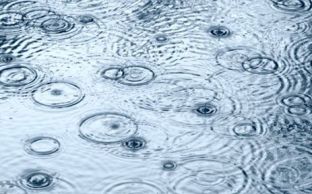
Raindrops are excellent design elements. Deciding whether to photograph rain drops or threads is the first decision to make. If you want to “freeze” drops, a shutter speed of 1/250 is recommended. For thread rain that runs through the entire image, you need slower shutter speeds. Of course, you can bring out interesting details again. For example, capturing a drop at the moment it hits a water surface. To capture this magical moment with a camera, it is necessary to shoot as close to the ground as possible. This will make the jumping raindrops look even more expressive. Leaves where the rain bounces off also make a fantastic subject.

Explore different motives

Raindrops are one of the go to’s, but there is so much more to discover. Thunderclouds, for example, bring more dynamics into the picture. Light reflections on wet streets or puddles that reflect the skyline can also be skillfully used for image composition. Moreover, the wind is also photogenic. It gives the image more tension and creates that certain something. To capture these elements, it is important to work with motion blur. This will give the image more dynamics.

Photos in fog

Fog creates the mystic atmosphere in a photo. Especially when sunlight hits the fog, fantastic color effects are created. The fog then shimmers in a light yellow-golden or even in a delicate bluish tone. This is not only interesting, it is also the perfect backdrop for captivating photos. Missing out on the classic in fog photography is not an option for any photographer: Rays of light making their way through the fog have a fascinating effect. Here the position is crucial! Standing in such a way that it is possible to work with the backlight. This brings out the light rays particularly well.

However, the autofocus of many cameras can fail with foggy subjects. The reason for this is the often low contrast. Therefore, focusing manually or using the hyperfocal distance is the way to go. In addition, the exposure needs to be readjusted manually as well.

Header Image © Pawel Kosicki

How to: Tips for Photo Editing

Raw Format without Loss

Nowadays most cameras, especially professional ones, include a RAW-function which allows saving images in a raw data format. This setup is perfect in order to rework pictures without a loss thanks to its large dynamic range. Unfortunately, there is no standard of RAW data yet, causing differences between camera manufacturers and models. Nonetheless, the internet offers a wide range of converter tools, helping to easily edit raw image data. For example, the Adobe-DNG-Converter transforms your data in a uniform format. Afterwards, the pictures can be adjusted with common photo editing tools. All RAW data not only have marginal differences, they also share two substantial characteristics. Firstly, the original image quality remains, including all details captured by the image sensor. Subsequently, the pictures always need to be edited. Secondly, the storage requirement increases.

Lightroom to edit image raw material

Not all shots are always 100% perfect. Honestly, they probably are never immaculate at first. Consequently, many photographers rework their data with editing tools such as the professional image editing software Adobe Lightroom. Lightroom was designed specifically for RAW formats. Beneficial is that this tool does not work destructive, meaning it is always possible to undo all changes made. The finished results can be synchronized with the original images on the user’s own computer. This gives Apple users an advantage for the time being, but an APP for Android devices is already planned.

LightZone 4.0 as free RAW converter

A free substitute for Lightroom is LightZone which is an open source project since its 4th version. Thus, it is a freeware under BSD licence for Windows, macOS, and Linux. LightZone is not only suitable for converting and processing RAW files, but also for JPEG or TIFF. Additionally, it offers similar tools for editing individual image areas as Photoshop.

JPEG decreases Image Quality

Joint Photographic Expert Group (JPEG), representing a cooperation of experts who developed this format. It is the most common used imaging formation, but has one major downside, the loss of picture information. Even though most camera models enable to choose the compression ratio, but it does not prevent a loss of details on photographic prints. In addition, there are some limits occurring while editing JPEG photos because the internal software of the camera already performs some editing processes. Especially, once changes have been made, they can only be edited afterwards to a limited extent. Overall, JPEG uses less storage capacity, but therefore provides fewer possibilities to enhance and edit the image professionally.

Image Optimization through FUJIFILM Ordering Software

The automatic image enhancement of myFUJIFILM is perfect for everyone who has not the possibility to optimize an image template for photo prints themselves. This is particularly suitable for unprocessed image files that need to be brightened. Please deactivate the automatic image enhancement in the ordering software or on our Internet platform for all images that have already been edited.

Why is image resolution so important?

Digital images are converted into small dots when printed (so-called dots per inch – dpi). The more dots per inch there are, the less individual dots the human eye can perceive. This means that the dots blur into an overall image and the photo looks razor sharp. Therefore, it is important that the image has a resolution of 300dpi. Moreover, it is decisive to consider the fact that the subject might look perfect on the computer, but the print can still be blurred later.

The reason: most monitors have a resolution of 72 or 96 dpi. This corresponds to about one third of the image format. To ensure a flawless print resolution, you should therefore rather determine the actual dpi number with the following formula: dpi = (horizontal pixel count of the photo x 2.54) / width of the photo

For example, a picture width of 15 cm and a horizontal pixel count of 1600 will have 271 dpi. Of course, calculating the value for each photo is not necessary at this point. Our software (ordering software / internet platform) shows via a warning triangle if the image quality is sufficient or insufficient for the selected format. If the image does not meet the requirements for a photo print in the desired size, there is the option of selecting a smaller image format via the selection menu. The formula is still very practical, as it helps to check shots at random. This makes it easy to calculate the right image format in advance.

Once the image processing and a quality check is completed, the next step is to order the prints. Fujifilm’s photo labs expose digital images on smudge-proof FUJIFILM photo papers. The images that are developed in this way are always of high quality. Digital photos that are printed out on your PC at home will therefore never meet this standard.

Header Image © Jerred Zegelis

“NOTES FOR AN EYE FIRE”

Aleix Plademunt’s long-term, research-based projects are replete with philosophical questions that explore issues of time and distance, and examine how photography conditions the way we see things.

Formerly, he wanted to become an engineer, but quickly realized that photography was his passion. Consequently, he abandoned his technical engineering studies and dedicated himself fully to photography. Since his graduation in 2003 he has not stopped working on personal projects such as Espectadores (Spectators; 2006), Nada (Nothing; 2007), Trafalgar (2019), Iberia (2019), Intempèries (Hinterlands; 2021) and many more. Plademunt is also an author of eight books, has been an artist-in-residence several times and has received different scholarships to develop or continue with his projects.

The “Almost There” project has been one of the highlights of his career, hosted in the Le Bal room (Paris), IMA Gallery (Tokyo) and the Centro de Arte Alcobendas (CAA; Madrid, 2016). Overall, he has had more than 20 individual and more than 50 collective exhibitions since he finished his photography based studies. His next exhibition will be presented by the Sala Canal de Isabel II (Madrid) the Matter project in its entirety in May 2022.

Aleix Plademunt’s work unpacks constellations of images that put carefully composed photographs into relation with one another to generate new dimensions of meaning. His project “Notes for an Eye Fire” is the first exhibition of a new series of transdisciplinary projects entitled Panorama. It displays 18 photographs expressing ontological contemplations of human culture, its origins and evolution, and its relationship to the universe, the earth, and matter. Accompanying the photographic installation is a panel with footnotes that shed light on the artist’s motives for choosing these very specific themes. He is taking us on a journey that begins with the static noise of an analogue television and ends with a sunset in Hostalric, his birthplace in Spain.

Practically all photographs in the exhibition have been taken with the Fujifilm GFX 50R large format camera and GF series lenses. Additionally, the copying carried out in the Dinasa professional laboratory has been of optimum quality thanks to the Fujicolor Crystal Archive Professional Maxima paper. The exhibition will be displayed until February 27, 2022 in the Museu d’Art Contemporani de Barcelona.