tutorial

Stretch yourself – by Paul Sanders

3

by Paul Sanders

paul sanders mugshotThere are many times that using a wide angle or telephoto lens just won’t get the results you want. They’re either too wide or too tight but you know in your heart that your viewpoint is correct.

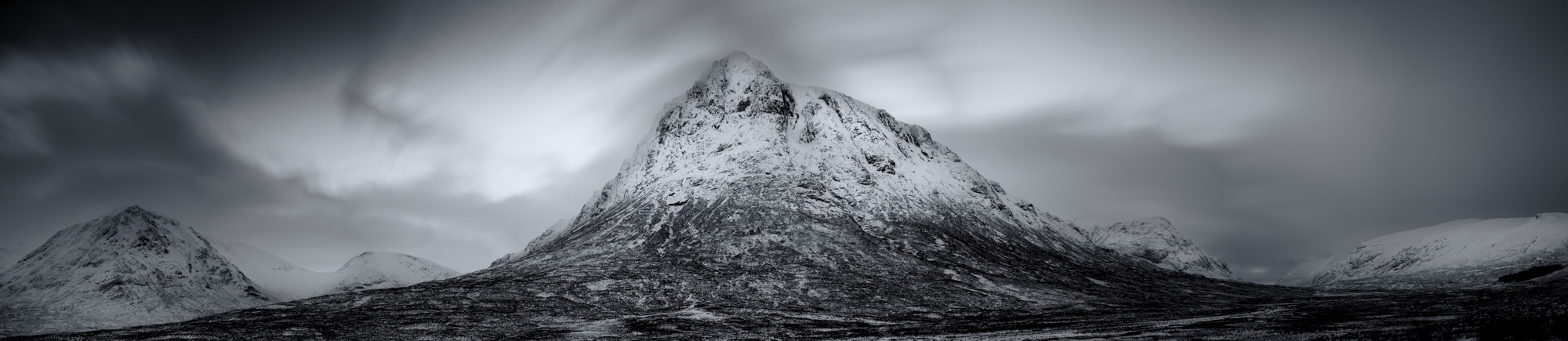
It’s frustrating and causes many photographers to give up and go home without a shot they’re happy with. However you should persevere and with the introduction of photo-stitching software built into Lightroom and Photoshop you should try the third option which is to shoot a stitched panorama.

By stitching together individual images you can render your scene in greater detail and make extremely large prints without the image breaking up.

For those who want a bit of background early examples of a panorama include the Bayeux Tapestry, at nearly 70 meters in length it’ll take some stitching to get a photograph that will rival that!

I’ve shot panoramas for a number of years and find the discipline fascinating. The normal guidelines of composition do apply, but they also don’t – you have much more area for the viewer to explore, more details being captured and there can be cameo roles for people in the different areas of the image. These all come together to create a story or feeling that literally absorbs the viewer – well that’s the idea anyway!

To shoot your very own panoramic image:

Firstly, if you can – use a tripod

It’ll make stitching the images together far more straightforward. Make sure your tripod is level too – most come with a spirit level but luckily most of the Fuji X series have horizon levels built in. If you press the display/back button on the back of the camera a few times this normally brings it up on screen if it has one. To check that the camera and tripod are level, gently pan the camera from left to right and check the display to see if the level line is straight throughout the motion. When attaching the camera to the tripod – set it so that you are shooting a series of upright images (portrait orientation). You’d be forgiven for thinking that you should shoot three or four landscape images – although you can if you wish, but you will end up with a very strip like image. I have found the upright method to be far more rewarding.

Untitled

Your focal length is generally a little longer than when shooting conventional landscape images.

For example, I recently shot a panorama in Paris using the XF50-140mm, to get the same result normally I’d have needed to use a XF10-24, but the detail in the bridge and the compression of perspective would have been lost.

In a perfect world you would use a panoramic tripod head and set the nodal point of the lens.

Basically this means the middle of the lens sits over the middle of the tripod – but with good stitching software you can get away without it being set, if you’re careful. The reason for this is that if you have the nodal point set correctly the perspective doesn’t alter as you rotate the camera, but when the lens is off-centre perspective from the lens to the subject distorts ever-so slightly.

Once you have chosen your composition and have panned the camera backwards and forwards a few times to check your image works, you must set your focus and exposure. Once set, do not alter them, otherwise you get very awkward tonal changes between the different images. The same applies to graduated filters – although you can adjust them slightly.

Finally you are ready to shoot!

Start on the left-hand side of your shot and take your first picture. Then turn the camera using a panning motion through about 15 degrees, or using the framing grid on the screen – move it round by 1/3 of the frame – this will give you enough overlap to avoid the distortion caused by turning your camera. Repeat this shooting process until you have completed your full composition.

4

Once have finished your series – shoot a blank frame so you know where the start and finish is.
You may need to fine tune your shot so always check the image on the back of the camera to make sure you’ve got every aspect of the shot you need.

When you get home the process is very simple.

Load your images into Adobe Lightroom – highlight the pictures that make up your panorama – take your cursor across the top menu bar to the heading ‘Photo’ then scroll down to ‘Photomerge’ and select ‘Panorama’. Lightroom will show you a rough render of the image then simply press OK and a few seconds later you’ll get the stunning panorama you planned.

Occasionally Lightroom doesn’t quite do the job, so if that happens – open the images in Photoshop, use your cursor to navigate through File – Automate – Photomerge – Panorama – the same process will happen only this time you will have a layered Photoshop document to work with.

It will take a little practice to create the perfect image but it’s great fun to try. For more inspiration look at the work of Horst Hamann or Nick Meers

Make a home studio – in your bath!

DSCF0214

Written by Roger Payne

The time had come. I’d been trying to justify keeping my X100S and X100T for some time but, in reality, since T had arrived, S had been spending increasingly lengthy spells in the cupboard. So, with a heavy heart, I decided to sell. The obvious route was on eBay, so I cleaned the camera up and took a couple of snaps before preparing my listing.

DSCF0197

My initial shot (above) was very typical of the sort of image you see on eBay – lit with flash from the front, it hardly shows my lovely X100S in the best light, while the background is distracting. I didn’t think it would appeal to buyers, so I decided to try an alternative tack and headed upstairs into my bathroom…

DSCF0179

Admittedly, this isn’t the most obvious room in the house to start taking product pictures but, in reality, it’s got a ready made studio for product shots – the bath. White, with a nice curve, the bath bounces plenty of light around to get even coverage and it has a clean, uncluttered background that won’t distract from the item on sale.

DSCF0184

Using an X-T1 with an XF18-55mm lens, I positioned the X100S at the opposite end to the taps, flicked out the X-T1’s rear screen and used the lens cap under the end of the lens to keep everything nice and straight. The X-T1’s screen is perfect for images like this, although fixed screen X-series models will be fine – you might just have to contort yourself into the bath a little! I chose an aperture of f/11, ISO 1600 and used the two second self-timer for hands-free shooting and took a shot.

DSCF0208

Not bad. Considering this was under tungsten light in my bathroom, I instantly had a better image than my earlier front-on flash lit effort. There was, however, a slight orange colour cast as I’d left the X-T1 on the Auto white-balance setting. I switched to the Incandescent white-balance option and took another.

DSCF0206

Better. The colour cast has now all but gone, but I still thought it could be improved further – the highlight on the lens and on the handgrip were distracting, caused by the main light above and to the left of the camera as you look at it. To overcome this problem, I deployed a diffuser on the bath over the top of the camera. I had a ready-made one, but you could use a large sheet of tracing paper to get a similar effect.

DSCF0192

DSCF0209

Hey presto, the distracting highlights had disappeared! But I still wasn’t completely happy, so I tried one more option, leaving the diffuser in place and attaching an EF-42 flashgun on to the X-T1. I pointed the flashgun head straight up so the light bounced off the ceiling and switched the white-balance back to Daylight.

DSCF0194

The result is below. Good isn’t it? And you’d never know it was taken in a bath. Naturally, you don’t have to use this idea purely for auction site listings, you could be far more creative, but there’s little doubt that this is a great way to boost the look of items you’re selling. I posted the listing and sold the camera for the price I wanted within a couple of days. What did I use the proceeds of the sale for? To buy an X70, of course!

DSCF0214

Pet Photography

JRXT7877By John Rourke

w360_6415757_tutorialbannerfordotmailerNot many people realise it, but before I started travelling and shooting Motorsport, photographing pets was a major part of my business. I would shoot a lot of equine and dog portraits with the odd cat, snake or rat thrown in now and then. I still run Pawfolio, but it’s now more a project of love, or reserved for when people who know me as ‘the pet photographer’ really want me to shoot their most beloved….. not the kids, yep it’s always the dog!

I see a lot of people posting photos of their pets on instagram lately, with some pets even having their own pages. So I thought I would put a few tips together that might be fun to try out if you want to get a great shot of your own pooch…. some of the tips might even work on pictures of the kids too!

For my doggy model, I’m going to use Bria aka ‘The Beast’, my beautiful Sprocker Spaniel. These shots all involve natural light as I wanted this article to be of use to everyone. As long as you have a camera and a lens you can get stunning shots of your beast without expensive lighting.

Preparation

In my ‘Pawfolio’ bag. Don’t panic! You don’t need all of this! this is just some of the equipment I use on various shoots… If you have only one lens and a camera you’ll be fine 🙂

Camera: XPro1, XT1, XT10
Lenses: 18mm F2, 35mm F1.4, 10-24 F4, 90mm F2, 50-140mm F2.8
Lighting: Ambient/Natural Light
Extras: Dog, lead, willing assistant (wife, kid, person you met on a dog walk?), dog treats / squeaky toy / bouncy ball / whistle, silly voice, insurance (if you want to shoot other peoples dogs!), mobile phone

Top Tip! Things become massively easy in life once a dog knows how to sit, stay, and look at food!! this is where all that training pays off! You will need a few basics such as;
Sit, Paw, Down/Sleep, Stay, Come…
(We had to learn some of these commands in polish once for a clients dog we photographed.)

A food-orientated dog is perfect, if this isn’t working then it’s down to the favourite toy, bouncy ball or failing that, making stupid noises…..dogs love this! The right noise will get a dog to tilt it’s head in a way that looks cute but whilst saying ‘what are you doing, human?’

Play with your beast first;

  1. this builds a little trust between the dog and yourself.
  2. It’s fun for both of you,
  3. it burns off the dog’s energy reserve

A few minutes playing around the kit isn’t a bad thing either, it lets the dog know that the camera is nothing to be worried about and not something strange and dangerous…

Around the house – Your own dog

Ideal for practice and often the easiest of images to shoot are where the dog is relaxed in their own surroundings or favourite spot. I normally wait for ‘Beast’ to find somewhere nice to settle or I encourage her to sit roughly in the right place. Quite often I’ll pap her as she drifts off to sleep. These are candid based shots but can turn into gorgeous intimate photos.
DSCF3957

I use any of the following 18mm f2, 35mm f1.4 and the 90mm F2 mostly to achieve the shallow depth of field for this type of shot. The XF35mm f2, XF16, XF23 and XF56mm would be amazing also. Any lens at  F1.2 – F2 will make a stunning image. I often use the X-Pro1 and X-T1. The OVF on the X-Pro1 can be really useful in hybrid mode during low light if the EVF wont preview the shot.

#Tip – You can put the Fuji camera to silent mode if the dog is too distracted by the shutter sound. Beast used to hear the shutter then pounce on me because she thought the sound meant that the shoot was over.

The candid shots I usually try to get for every dog shoot are:

Nose

That big snuffler is amazing. Shot at 1.2 or on a Macro it makes a stunning detailed image.
JRXT2184

Paws

The texture of the pads or the hairy paw is beautiful. If it’s your dog, hold the paw and capture a paw & hand selfie #TooCute

RXP14124

Face

Poor beast with the collar of shame
"What's going on down there?"
“What’s going on down there?”

Like any face or portrait I shoot, I always focus on the eye closest to me. If you shoot the furthest one and the closer one is blurred, the image just looks wrong – please don’t do it!!

#Tip – Try shooting the dog from ‘a dogs view’ or from below the dog looking up. Crawling around in the dirt is just an everyday thing for me, but I think it’s really worth getting the unusual perspective. This is also now where the flip out screen is genius and the X-T1 or X-T10 becomes king.

That said, don’t rule out the standing up traditional viewpoint. Sometimes if you stand right over the dog looking down, you get that ‘puppy face’ beaming back up at you, and there is nothing cuter.
JRXT2267

Outdoors

For outdoor shots, choose a nice spot your dog is going to love and that has some features or atmosphere about it. The beach is an awesome place for dogs, and one of our favourites, with lots of space, great light, and lots of zooming. For this a 90mm, 50-140 or the new 100-400 is ideal because the animal can move around freely but you can still fill the frame. This situation is ideal for the X-T1 or X-T10 because of their high frame rate. I would probably go for the X-T1 more to help keep the sand, salt and spray out of the camera. I would also recommend the weather resistant lenses for this type of shoot. A rogue wave splash or a shake down from the Beast can spray your gear from a surprising distance.

You won't believe the range on this thing!
You won’t believe the range on this thing!

Rivers are great too, but always check the current is safe. Look for a spot on the bank with space and great moody lighting, perhaps between some trees. You should make sure your beast can get in and out easily, and I always have someone with me to throw a ball or something safe for the dog to chase, or I sometimes just sit and watch the animal play and have fun on their own.

My favourite lens for outdoor dog shoots has to be the 50-140 F2.8. With good flexibility and a shallow depth of field at F2.8 there’s always gorgeous bokeh in the background. I try to keep the shutter up between 2000th and 4000th of a second to keep the motion frozen. If the light is changing or the dog is running through light and dark patches, try ‘auto ISO’.

Set the the auto ISO range function to work between ISO 200 and 6400. To control the aperture, try to stay in the range of F2.8 – F4/5.6 or if you want some amazing textural shots and there is loads of light, dial in F8 – F11. Again get low… I have the tilt screen for this, or just get in the dirt and sand and the shots will be amazing.

You could also try the 16-55 F2.8 if you want the shot to be a little more environmental, shoot wide and get more of the landscape in your photos. When you print this type of shot they look great printed large.

JRXT3707-Edit-Edit 2

If you want to get really creative try ‘panning’ the dog. This is a technique we use on the track to shoot cars at the races. Select a shutter speed between 1/8th (very creative) up to 1/200th (suggest you start there and work your way down to 1/8th), and rotate your body at the hips following and tracking your dog as it runs past. You want to work your shots at slower and slower shutter speeds to create a wonderful action arty shot…

Dog pan
Doggy pan

More about the author

John + Beast
John + Beast

John Rourke has been shooting professionally for 15 years and is the owner of Adrenal Media, the Official Photography Agency for the FIA WEC (World Endurance Championship), and the ELMS (European Le Mans Series) including the world famous ‘Le Mans 24hr’. He shoots all of his professional and personal work on Fujifilm X series cameras.

Links
Adrenal Media on instagram
John Rourke website
Adrenal Media website
Pawfolio Facebook


Big tips for shooting small

header image
w360_6415757_tutorialbannerfordotmailerWhat’s not to like about macro (close up) photography? Getting closer to your subjects to see them in greater detail will always appeal, so picking up a few techniques to help you get better at shooting close ups is always worthwhile. Before we get down to the picture taking, let’s cover off the basics.

First, to get the best results you’re going to need a macro lens. That doesn’t mean a lens that has a macro setting, it means a proper macro lens. Such optics aren’t only suitable for close up work. The FUJIFILM XF60mm F2.4 Macro lens that we’re using here, for example, doubles as an excellent lens for shooting portraits, but it’s optically engineered to excel at close ups.

When it comes to macro lenses you’ll often hear the term ‘reproduction ratio’, such as 1:2 or lifesize. Put simply, this refers to the size the lens can reproduce what it’s being pointed at. A macro lens that offers a lifesize (or 1:1) ratio will reproduce the subject at the same size on the sensor as it is in real life. 1:2 means the subject will be reproduced at half lifesize, and so on. The XF60mm offers a 1:2 reproduction ratio.

Finally for now, it’s important to know that the closer you get to a subject, the smaller the area that appears in sharp focus. Given this, focusing has to be extremely precise, which is why a tripod or some other form of support is recommended.


Scenario 1: Shooting macro outdoors

With spring just around the corner, it’s obvious to brush up on your macro skills so you can shoot flowers. Indeed, for this very blog, I found a clump of snowdrops in my local park. Shooting macro images outdoors brings a number of challenges. The light levels vary which can cause exposure issues and, on the day I shot, it was windy, which causes delicate flowers like this to blow around a lot. That means you’ll need to shoot plenty of images, so make sure your battery is fully charged and you there’s plenty of room on your memory card.

I used an X-T1 for all these images as the fold out LCD is an absolute godsend. As I was working at ground level, it avoided me having to lay down on the cold ground. Instead, I popped out the LCD and rested the camera on a rolled up coat for support as my tripod didn’t go low enough.

I picked my subject carefully, finding one bloom that was isolated away from a larger group so I could focus attention on it and still get some complementary colours in the background; always check what is behind your subject before you shoot.

DSCF0131

The first shot I took (above) was with the XF18-55mm set to 55mm and at its closest focusing distance. To be fair, this isn’t a bad result at all, but doesn’t really have a huge amount of impact as the bloom is quite small. So I reached for the macro lens and took this:

DSCF0137

It’s a big improvement with the bloom occupying more of the frame, but the light is a little flat, so I used a small silver reflector placed under the snowdrop to push some more light in and get an even better shot:

DSCF0140

I could have stopped there and been happy, but I also had the FUJIFILM MCEX-11 and MCEX-16 extension tubes with me, so I gave them a try. The tubes fit between the lens and body and allow you to focus even closer. Both tubes maintain all functionality between lens and camera including autofocus, but the focus can hunt a little more and as I was getting so close to the snowdrop I opted to switch to manual focus and use Focus Assist to enlarge the subject on the X-T1’s rear LCD for focusing accuracy. AF hunting isn’t the end of the world, but means you can end up with shots like this where it’s focused on the background rather than the single bloom.

DSCF0142

I took three further sets of images, one with the 11mm, one with the 16mm and then one with the two combined, which got me closest of all. The reflector stayed in place for each image, but the sun was in and out hence the variations in light levels. Take your pick!


Scenario 2: Focus stacking indoors

Time to warm up and head indoors to try another macro technique: focus stacking. Here, you take a range of shots with the lens focused on different parts of the subject before using Photoshop to stack them all together and get one super sharp image.

As previously mentioned, the closer you get to the subject, the smaller the zone of sharp focus so it can be difficult to get the image sharp from front to back. One solution would be to put the camera on a tripod and use a small aperture. But this could make for a long exposure, plus lenses aren’t always at their optical best at smaller apertures. It’s better to pick a central aperture – here I used F5.6 – and stack the images together.

DSCF0192

To make this technique work, you’ll need something called a focusing rail. This attaches to your camera and allows you to make precise incremental changes by using the measure on the side of the rail. I used the 454 Micropositioning Sliding Plate by Manfrotto. I attached this to the X-Pro2 and XF60mm with MCEX-11 extension tube I was using inside, then put both on a tripod and framed up my subject – a dusty snooker scoreboard. In case you wondering why I didn’t remove the dust, this is purely to show how much detail you can get using the stacking technique.

DSCF8664

With the XF60mm set at F5.6 and manually focused on the number 9, here’s the result I got (above). The 9 is nice and sharp, but the in focus area soon drops off on either side. Next, I didn’t touch the focus on lens and moved the focusing rail until the point nearest the camera came into focus. Noting the distance on the rail, I took a shot. I then moved the rail until the furthest point from the camera into focus and took another shot. Again, nothing on the camera was changed and I noted the distance on the rail.

The distance between the two focus points needed the rail to be moved by 4cm. So, again, by not touching any settings on the camera or lens, I moved the rail incrementally by 2mm at a time and took further shots. This gave me a total of around 20 images. Shooting over, I went to my computer and fired up Photoshop.

I opened all the files at once in Photoshop and then chose File>Scripts>Load File into Stack then on the dialogue box that opened, I chose Add Open Files and OK. With this complete, I then opened the Layers palette in the resulting image and selected all the Layers before choosing Edit>Auto-Align Layers. Once this was complete, I then selected all the Layers again and chose Edit>Auto-Blend Layers. On the resulting dialogue box, I chose Stack Images and then hit OK.

Screen-Shot-2016-02-17-at-07.08.32

Depending on how much RAM your computer has, these processes may take a while, but once Photoshop has weaved its magic, you should find a sharp image where all the frames are stacked together. There is a possibility that your image will have some odd overlapping elements caused by the slight variance in camera angle between each frame as you move the camera along the rail. In this case, I did, but I was able to crop in slightly to removing the offending areas. If that’s not an option, you’ll need to try a different subject matter and preferably shoot on a plain background such as white or black.

_Stacked

If you’re happy with the result, finish by choosing Layer>Flatten Image and you’re done!

So there you have it – macro in a nutshell. One final point to bear in mind, macro photography is time-consuming to get right. Don’t expect great results straightaway, although there’s little doubt that patience will be rewarded. So when it comes to macro ideas, think big!

Preparing and maintaining your kit for the great outdoors

Sloth - Ben Cherry
When I’m heading out for a long day(s) in the outdoors this is the kind of equipment I usually take with me. Now it may be more than you would ever need, but for those looking to get into landscape or wildlife photography, particularly those about to head out on safari – this blog is for you.


A bag for your gear

Camera gear ready for Costa Rica!

There are too many camera bags in the world, meaning that the choice available is verging on ridiculous! If there is one item that ignites G.A.S (gear acquisition syndrome) over anything else it is probably camera bags. I’m currently using a Pelican 1510 hard case with a Thinktank Ultralight (discontinued) that fits inside the case. This basically acts like a backup backpack as it isn’t the comfiest bag for long treks, so it generally acts as a safe and secure place to store gear. I took this set up to Costa Rica because I’m based there for such a long time so the pain of travelling with such a heavy pack was negated by the benefits it offers me over the six months away, namely water-tight, lockable security.

All fits in my Millican Dave

For when I’m out and about I have two non-camera bags to choose from: Millican Dave, a great hiking bag that when combined with a cheap padded insert becomes a very good camera bag. Or a dry bag backpack which I often use on light treks where the conditions are looking a little ominous. This isn’t to say that Dave isn’t up to the challenge (he’s pretty good at being water repellent and has rain cover), but out here in the rainforest, when it rains, it pours! And having a bag that can in fact be submerged helps to ease the mind. The advantage of both of these bags is that they are easy to stuff lots of items into. One of the issues I usually have with camera bags is that once all of it is padded, it has lost of significant percentage of space for misc items. Misc items are usually seen as add ons with certain bag companies, leaving little room for other helpful items, so hiking bags can be really helpful non-camera gear.

Gear for Ice Hotel Commission
Kit in action, covering ice church!

What photography equipment do I take?

Cameras:

  • 2 x X-T1 (fantastic all-round cameras, definitely brought the X-Series to a wider audience, and very much looking forward to trying out the new X-Pro2!)
  • X100s (Out of all the Fujifilm cameras I’m lucky enough to have this is the one I’d probably sell last! Does everything very well, wonderful lens/camera, makes you think much more about your photography. Above all else, it is small enough to carry around everywhere. So some of my most treasured photos are taken with this because otherwise it would have been left to my phone. Combined with the wide angle and telephoto adapters, makes for a brilliant little system. I haven’t had the chance to work with the T yet.)

Lenses:

  • XF10-24mm (Almost perfect – fantastic lens, hoping for a WR version in the near future.)
  • XF16mm (Generates so much creativity, from the extremely close focusing to the fantastic depth of field control, 24mm equiv. is quickly becoming my favourite focal length.)
  • XF16-55mm (Fantastic workhorse of a lens, built to last and equipped with image quality to make any prime-lover happy.)
  • Soon to be – XF35mm F2 (when I get back to the UK this is high up on my list – 50mm equiv. lens, small, fast and discrete WITH WR!)
  • XF50-140mm (My most used lens – can’t really say a bad word about it, produces the goods every time, simply fantastic!)
  • Nikon 300mm F2.8 ED Manual focus (The elephant in the room, because my current role is focusing on birds, I needed something longer than 200mm equiv. As the much anticipated:
  • XF100-400mm Isn’t quite out yet I opted for a quirky alternative… Yes it is heavy, yes it is manual focus, but thankfully peaking assist and a sturdy tripod help to make this a viable option. Nevertheless, my back is looking forward to Fujifilm’s new super telephoto zoom!)
  • Fujifilm extension tubes and Nikon 2x teleconverter (yep, that gives me a 900mm equiv. lens… Absolutely bonkers!!)
Frankenstein X-T1 filming sloths

Misc:

  • Filter system (Depends on what you prefer to photograph but I highly recommend a neutral density graduated filter set up and a circular polariser.)
  • Flash system (Lots of options out there, depends what you can afford/prioritise – space or power output.)

Things to always keep in your bag

Get some silica packs and store some in your backpack, these can be the difference in saving your precious lenses. Many believe that fungus is an issue reserved for older lenses, unfortunately this isn’t the case, and in particular non-weather resistant lenses are vulnerable so please look after your expensive investments! Bearing that mind, always have some lens cleaner and lens cloths in your bag. You never know when a speck of mud or raindrop will ‘attack’ your lens. Though easy to deal with they can easily ruin a photo, so best to deal with any artefacts asap.

Other items I have in my bag:

  • Duck tape (If you use lights in particular duck tape can be invaluable to secure lights in obscure locations to light your photos or simply to repair your watertight gear)
  • Pen knife (Always ends up being useful for different things but of course be mindful of this when travelling internationally.)
  • Table top tripod (Lets face it, tripods are always annoying to carry around and generally always scream PHOTOGRAPHER, but they are invaluable for certain situations. Nevertheless on some occasions you might not be carrying around a full size tripod so as a small, light back up is generally a good idea, so have a little tripod in the bag.)
  • Remote trigger (I have a variety from wired to wireless, all with their own pros and cons)
  • Rain cover (Generally not for me as in the tropics it is nice to get rained on! But I have a cover for my camera if I’m still shooting in moist conditions.)
  • Rogue Flashbender (A relatively inexpensive flash accessory, easy to pack and very effective, especially when used off-camera to help quickly improve a portrait.)
  • Food and water (Especially if you are trekking, these are the most important items to have on you!)
  • Insect repellent (Insects love me so I usually carry some form of bug spray, DEET is the best but pretty grim stuff to cover yourself with so I have a natural remedy that I prefer. Also a form Vitamin B is meant to be good for repelling mosquitoes so if you know you’re off to a problem region then start some Vitamin B pills or alternatively marmite.)
  • Hat and layers (Yes suncream helps to fight off sunburn but a hat can make all the difference when you are out all day. Depending on where you are, the weather conditions can change quickly so it is important to have spare clothes if it is likely to get cold.)
  • Rehydration sachets + general medication (You can never fully guarantee what is going to happen when you go out and about so it is best to carry some simple things with you to negate any ‘niggles’ that could hamper your day.)
  • Communication (Generally a normal mobile phone to contact anyone if necessary. Not for selfie usage!)
  • Scarf/shall (This might sound strange, being described as a ‘must have’ item, but they have a wide range of uses, from portable shade, towel, dust remover, etc.)

Thick straps, and a comfy all-round design. Makes long days so much more enjoyable!

Thick straps, and a comfy all-round design. Makes long days so much more enjoyable!

Other items to pack in the hold:

  • Sensor cleaning kit (I’ve made the mistake far too many times of not bringing this with me and regretting it pretty quickly. The X-Series is very good for countering this problem, especially considering how often I change lens, but it’s best to pack safe.)
  • Spare chargers/cables (This may well be over the top for certain trips but if you are going into very remote regions the last thing you want is to not be able to charge your batteries or download your photos.)

Kit care in the tropics

Taking a look at the gear I have brought with me to Costa Rica. From camera gear to items keeping the cameras working, I hope this will give you a good visual representation of what to take on your next adventure!

[youtube https://www.youtube.com/watch?v=iPujJYAHIuQ?rel=0&showinfo=0&w=1280&h=720%5D


Keep your kit dry

If visiting the tropics or areas where conditions can often be very humid then it is important to figure out a way of keeping your kit dry, generally wiping away any moisture and having some silica gels in your bag should be fine but for my current placement I created a form of ‘dry space’, an area which I draped a tarpaulin in front of and had a light bulb at the top, this is generally left on whenever it is raining and works as a dry location to keep kit dry, anything slightly damp is kept as close as possible to the light bulb to dry it out and to hopefully kill off any fungus.

My camera bag system is constantly evolving but hopefully this will help some of you looking to take your camera into the great outdoors. First and foremost, remember to enjoy yourself, that is the priority. Cameras are wonderful tools for enjoyment and capturing moments, but don’t let the very item you use to capture moments get in the way of them. If you have any suggestions or ideas for other things to take with you in the great outdoors then comment below.

Until next time, happy shooting!

Ben


Ben CherryA little about Ben

Ben is an environmental photojournalist, zoologist and Fujifilm X-Photographer. His passion is showing the beauty and fragility of the natural world. Find more of his work at:

How to create a beautiful portrait

By professional fashion photographer Dave Kai-Piper

Dave Kai Piper-35w360_6415757_tutorialbannerfordotmailerPortrait photography is one of the most amazing genres in my eyes. Simple on the surface, yet complex and diverse underneath. At first glance, photographing people is pretty simple, but when it’s broken down into the 4 main elements: Location, Lighting, Subject & Camera we start to understand the subtle nuances of what it takes to build up a wide and diverse portrait portfolio.

To get started with artificially-lit portraiture, there are 3 main lighting types: Rembrandt, Split and Butterfly. Each of these lighting types has characteristics which allow us to be creative. And it’s by experimenting with each of these lighting types you will learn how to control the shadow placement on your subject, and how by combining these techniques you’ll discover the art of the portrait.

Here is a quick way to identify each lighting type:

Rembrandt lighting: Light will come across the face from a 45 degree angle in an elevated position from the eye-line of the subject. The bridge of the nose should create a triangular area of light under the eye the other side.

Split Lighting: the light will hit one side of the face or part of the head creating a deep shadow on the other side. Normally the light source would be behind the eyeline of the subject.

Butterfly lighting: Commonly used in beauty set ups, the light should present evenly across the face in line with the nose and high above the subjects eye-line. Even shadows under the nose are a sign of this lighting set up.


The shot

In the example I am using here, I have mixed two of these lighting types to give me the effect I am looking for. I have also used two types of light known as Hard light and Soft Light.

Hard light creates shadows with sharp edges; it is made by using undiffused light sources such as a Speedlight aimed directly at the subject.

Soft light creates shadows with a smooth transition between light & dark; it is made by using indirect light sources or by using diffusers to scatter and soften the light before it reaches the subject.

In our example we have set up the split light to have a hard light and the Rembrandt light to be soft.


How to create ‘The shot’

Firstly I set up the ‘Key Light‘ (most important light in the shot) to the Rembrandt Lighting position using a Cactus RF60 Speedlight & a Roundflash modifier. I found the exposure setting I wanted by selecting the f-stop I wanted on the camera after setting the ISO at 200. I left the shutter speed at 1/125th of a second.

Our ‘Hair light‘ is in the Split Lighting position and is set up to be used as a hard light. In the sample for this blog we used another Cactus Speedlight but this time modified with a piece of black wrap. This is the same as cooking foil or aluminum foil that you would find in a kitchen, but is matte black. It is very common in the film industry as a quick and effective way to shape light or to block light ‘spilling’ over to an area that was not intended. Here I have rolled it up and created a homemade snoot to give me very close control of the placement of light.

I then used a V6 Cactus Trigger mounted on to the camera hotshoe to control the power output of the flashes; which were mounted on a set of tripods remotely. This allowed me to work faster and in a more controlled way. Once ready, I took three images: one of each light firing independently and then one shot with both firing together to create the final look.

The angle of the camera for this shot was placed just below the subjects eyeline to give her a powerful look, and in this example I used the XF90mm lens to get rid of any unwelcome distortion that wide angles can give.

Focal lengths from around 50mm to 200mm are good for a head shot or portrait.

[youtube https://www.youtube.com/watch?v=gZxMlaufN3Y?rel=0&showinfo=0&w=1280&h=720%5D


My 10 top tips:

  1. Portraits are about timing, emotion & people, not cameras, lights or anything that is technical.
  2. The technical guidelines are always starting points and flexible at that.
  3. The bigger & broader the light, the softer the shadows will be. If you want contrast – move your light source away from your model.
  4. Soft defused light is better if you are trying to create a ‘beauty’ light
  5. Hard lights are great for creating hard edged shadows and character
  6. The story is in the shadows.
  7. When setting up your lights, use a lightmeter if you can.
  8. My lights are very rarely on full power, soft and subtle is the key
  9. Be creative, but don’t over complicate the shot.
  10. Avoid lighting people from below the eyeline of your subject

Final result

Here is the final resulting image which has been converted to black & white.

Model: Stephie Rebello, Lighting: 2x Cactus RF60 Speedlights
Model: Stephie Rebello

To see more of Dave Kai-Piper’s work, please visit: ideasandimages.co.uk