Product specific

Hint+tips, shortcuts, accessories to enhance your specific camera

Why do I love the XF18-135mm lens? Composition.

Good day everyone, I will have to call this a mini-blog as normally I ramble on for ages and bombard you with images – who knows, maybe I still will 😉

1504372_10154010549280534_5836271885610257265_oAs you may or may not know I’m an amateur photographer who loves to try out new types of photography – I’m sure this is not to different from many of you out there. When I first started out with photography I was educated that the more zoom you had the better. So when I was given the X100 for the first time I was quite baffled as to how to work a fixed prime lens. I felt restricted and puzzled as to why I would want one. Of course once I looked at the pictures from it, I was sold and this opened my eyes to the real aspects of what makes a great camera. The images were crisp, clear and full of vibrant colour, all I had to get used to was zooming without a telephoto lens – AKA the Hokey Cokey. Once I got this down though, there was no stopping me, I was out with my original X-E1 and 35mm prime lens and I loved every minute of it!

This leads me to the XF18-135mm. This time I had the promise of excellent image quality but with that lovely versatility of a zoom lens. When I first clicked it into position on the camera body and fired up the camera I was taken back by just how much I could see or not see depending on the focal length. It was something that took me back to the olde days of me using a camera, I was VERY excited to get out and use this new kit.

I decided upon a location in the local area that always seems to make a good picture, this being the Stevington Windmill. I looked at when the sun was going to set and got there about 50 minutes earlier to allow time for running across fields, fumbling with tripods and such like. Once I got a good position near to the windmill I shot this image.

TFST0106 - Copy
Focal Length: 49mm – f/5.6 – ISO200

I shot this image at the slightly wider-side of the lens to open up the landscape a bit – this to me gives a very peaceful feel to the shot. Compositionally (is that really a word?) I have dedicated two thirds of the frame to the sky as it is a sunset after all, and I think this really helps the landscape silhouette ‘POP-OUT’ from the skyline.

This next shot I really wanted to focus on the windmill and give a more intense feel. To do this I have used the lens at a longer focal length as this has a very clever effect on the composition. The more you zoom towards a subject, the more the background and foreground are compressed together. So this in turn pulls the Sun closer to the windmill and vice-versa. Not only that, but it also reduces the angle of view – cutting out all the peripheral stuff we perhaps don’t want in our shot.

As a side note – To get the composition I wanted using more zoom, I did have to move further back to accommodate the extra focal length. Basically this means I had to run like crazy across a field and keep checking to see if the composition was right as every moment I wasted meant the sun was getting lower and would soon disappear behind the hillside.

TFST0109
Focal Length: 98.6mm – f/7.1 – ISO200

These next two shots show this compression effect quite well I feel. It really brings the background closer to the foreground making for a more intense composition that would not have been possible with my 35mm prime lens.

And in case you were wondering, this is my better-half with her camera at her side relaxing whilst I’m running about like a madman saying things like “That’s great, just don’t move. Pretend I’m not here..” which was all great fun. Photography should be fun and if you can get your friends and family involved, so much the better.

TFST0092 TFST0089

Here’s a playful shot of some hot air balloons in the distance. I framed it up so that they sat on the furthest third of the frame to sweep your eyes across the beauty of the landscape. Because of the compression effect (pulling the background and foreground together) I could give the hot air balloons a bit more presence in the shot, especially when you consider the real distance between the main tree and the hot air balloons.

TFST0083

I really hope this inspires you to go out and have a play with your camera, shoot a sunset, bring a friend, mix up your compositions and most of all have fun. When you do all that great pictures will naturally follow.

P.S: Seems I managed to get a good ramble and bombardment of images in after all 😉
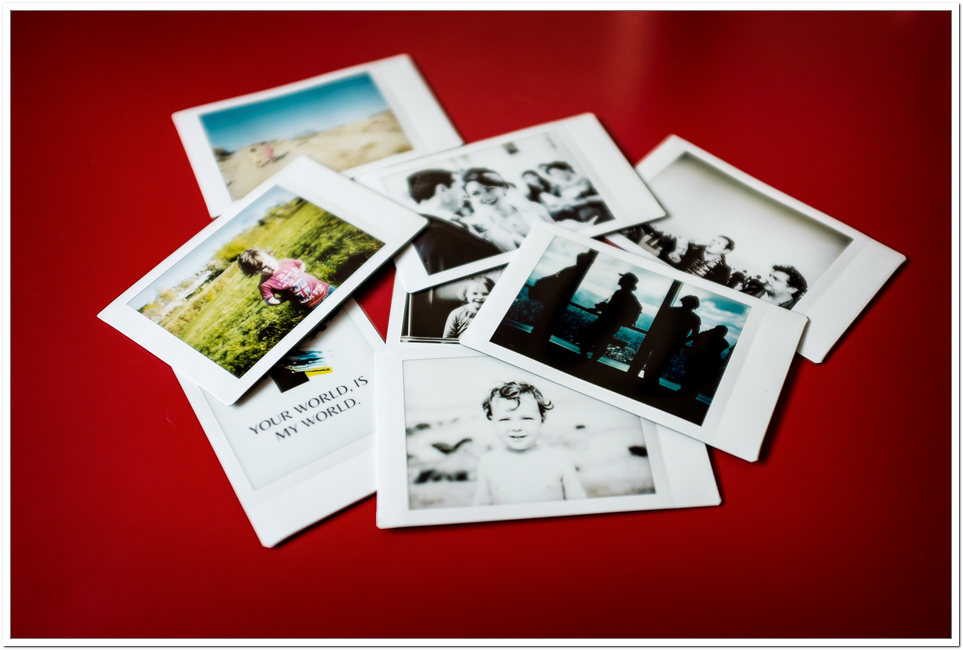
 

Fujifilm Instax Share SP-1 Smartphoto Printer – Review by Kevin Mullins

A little while back someone showed me the Fujifilm Instax Share SP-1 Smartphoto Printer.  At first, I though…meh!  I could see it’s uses, but I couldn’t see it’s uses for me.

Instax-Share-SP-1-1Instax-Share-SP-1-2

Instax Share SP-1 next to an X100S for size comparison

This changed once I received it last week.

Let me tell you a little anecdote;  My daughter has one of the Instax Mini 8 cameras.  It’s pink (she’s five years old).  She adores it and she snaps away at anybody who will allow her.  She has a little album and it’s been a wonderful way for her to enter into the world of photography.

So, when I received the Fujifilm Instax Share SP-1 Smartphoto Printer I was intrigued, more than anything, to see how I could utilise it in my day to day work.

The Fujifilm Instax Share SP-1 Smartphoto Printer is nicely designed, and rounded.  The buttons are tactile and well positioned.  There is a neat battery indicator and also an exposures remaining LED.

It looks good and is really quite discrete too.  I have a white one, and I’m not sure if other colours will be offered.

Instax-Share-SP-1-3
Battery indicator and exposures remaining LED are very useful
Instax-Share-SP-1-4
A very handy reprint button will duplicate your last exposure. Good thinking Fuji!
Instax-Share-SP-1-5
The device simply looks good and the branding is discrete.

As you probably know, by day, I’m a professional documentary wedding photographer, and my other passion is Street Photography.

Street Photographers I think will simply love this device.  If you shoot portraits on the street, as I do occasionally, I usually end up offering the subject a business card and asking them to email me (I always send them a small print in the post if they do email).  This is a laborious task right? and an even more pain if you are shooting abroad.

I can see me taking the Fujifilm Instax Share SP-1 Smartphoto Printer with me when ever I shoot street now.  It’s small enough (101.6mm x 42mm x 122.5mm / 253g ) to slip into a bag and the two CR2 batteries will last for around a hundred exposures.  Plenty for a few shooting trips for me.

So; engage with subject, shoot, print…..away you go.  Very cool.

I was a bit reticent about using it at a wedding.  My style is totally candid.  I don’t really do bridal portraits etc.  However, I gladly took the SP-1 with me to a wedding I shot in the South of France last weekend.

This is what I did – and this is where I think it will be amazingly powerful for wedding photographers:

  • Shot the wedding all day using my X-T1 and X100S
  • During the down time I WiFi’ed (is that a real word?) over an image from the X-T1 to my iPad.  If you don’t have a wifi enabled camera you can of course simply ingest the card to the device.
  • I used Snapseed to edit the image sightly.  A bit of contrast and conversion to black and white.
  • I printed on the Instax Share SP-1
  • I gave it to the bride and groom as I left
  • They cried….said it was wonderful….and showed it to everyone else.
  • Boom!  Added value for wedding photographers right there.

Instax-Share-SP-1-7Instax-Share-SP-1-8Instax-Share-SP-1-10Instax-Share-SP-1-6Instax-Share-SP-1-11Instax-Share-SP-1-12Instax-Share-SP-1-13

 Connecting the printer, editing and printing the image took around one minute in total.
Connecting the printer, editing and printing the image took around one minute in total.

I can see wedding shooters who offer a more formal type of photography benefiting from this as well.  Being able to take a portrait of Aunty Mabel and print it there and then is going to make you the good guy (or girl).

Fujifilm Instax Share SP-1 Smartphoto Printer Print Quality

The print quality is fine.  You are not going to lose print sales post event by handing these out.  They are very much aimed at resembling the Poloroids of past and that, they do very well.  According to Fuji the print resolution is 10 dots/mm (254 dpi) with 256 levels per color (RGB).  It’s not hi-res printing but the images that do come out are snappy and certainly of a high enough quality to make people go “Ooooo” and even, perhaps “Aaaaah”.

The physical size of the images are 62mm x 46mm, so not huge….but perfect for street shooters and wedding photographers a like I think.

Cool things I like about the Fujifilm Instax Share SP-1 Smartphoto Printer:

  • Very quick to connect.
  • The App Software is very easy to use.
  • The printer itself tells you via the green LED lights how many exposures are left on the roll.
  • The App Software tells you which images you’ve already printed, or if an image is not usable.
  • Print time is around 9 seconds in total.
  • Didn’t have a miss communication once.
  • It’s a pretty small device.
  • Comes with batteries and two cassettes of film in the box.

A couple of things I’d like to see with the Fujifilm Instax Share SP-1 Smartphoto Printer in the future:

  • The ability to print direct from a WiFi enabled camera (X-T1 for example) would be awesome.
  • A better set of templates and editing options in the App
  • It would be cool to have a strap too.  I know, I know, you aren’t going to walk around all day with this around your neck but if you are doing a run of portraits, at a wedding perhaps, it would be useful.

Using the Fujifilm Instax Share SP-1 Smartphoto Printer:

  • You need the Instax Share App.  I believe this is available for iOS (iPhone and iPad) and Android devices.  I just used the iPad version.
  • Simply hold the power button the printer down for about a second and it comes to life.
  • At the same time, it creates and ad hoc wi-fi network (you can change the name, password etc if you are security conscience).
  • Go into your device settings and connect to that network.
  • Launch the Insax Share App.
  • Select the image.
  • Edit, add text, rotate the image etc as you see fit.
  • Press PRINT.
  • Then wait around 9-15 seconds for the emulation to be exposed in front of your eyes.
  • Stand back and admire your work.

The application comes with some themes and basic editing functionality (though I suspect any serious photographer will edit the images first in another image editing app on their device).  There are some neat uses of the themes where I can see it being useful to put your name or your website address on the image via the software.  All very cool stuff.   You can make the image Sepia or black and white too but, as mentioned, something like Snapseed is far better positioned for this type of editing.

In summary – I think this is a great device.  I know there are similar things on the market but for me this is a well rounded all in one solution for printing your phone photos or from a wi-fi enabled camera.

I really, really, really, really want to be able to print directly from the X-T1 and other wifi enabled cameras though.  I think that would make this device go from seriously useful, to absolutely necessary for travel photographers, street photographers and wedding photographers who want to give their clients that little extra.

Enjoy it.  I did.

Written by Kevin Mullins

Testing the FUJIFILM XF23mmF1.4 lens

By Matty Graham

Fujifilm’s XF23mm has been hugely anticipated by X-series users, and after testing the optic, it’s easy to see why. With an effective focal length of 35mm, this is a ‘go anywhere, do anything’ lens. Suitable for street photography, landscapes and even portraits.

X-Pro1 - XF23mm - ISO 1600 F/2.5 - 1/640
X-Pro1 – XF23mm – ISO 1600 F/2.5 – 1/640

What most users will do when they unbox the lens, is flick the aperture ring straight to F1.4. I can’t blame them, the larger F-number gives beautiful bokeh, and amazing images, as well as the confidence to work in low light, without the worry of camera shake and blurry images. With most lenses that sport a fast aperture of F1.4 it feels like you’re attaching a dumb-bell to your camera. However, the XF23mm only weighs 300g, making it more than manageable on the X-Pro1 that I used here.

X-Pro1 - XF23mm - ISO 400 F/1.4 - 1/850
X-Pro1 – XF23mm – ISO 400 F/1.4 – 1/850

The aperture ring takes you through from F1.4 to the minimum aperture of F16. Instead of the typical AF/MF switch, the XF23mm features a push/pull ring that switches between manual and autofocus. There are also distance and depth-of-field scales on the barrel.

When using wider optics like this, there are usually two main areas of concern – barrel distortion and vignetting. However, the XF23mm aces both categories with virtually no distortion and vignetting is handled extremely well – even at F1.4.

X-Pro1 - XF23mm - ISO 800 F/1.4 - 1/2400
X-Pro1 – XF23mm – ISO 800 F/1.4 – 1/2400

The quick, sharp focusing that this lens offers is down to the internal focusing (IF) technology, which delivers speedy and discreet autofocus – let’s face it, you don’t want the lens to be buzzing away as you try to find focus during a candid street photography situation. Because of this internal focusing, the front of the lens doesn’t rotate. This benefits landscape photographers who use graduated filters.

X-Pro1 - XF23mm - ISO 500 F/8 - 1/60
X-Pro1 – XF23mm – ISO 500 F/8 – 1/60

When it comes to results, the XF23mm really delivers. The lens is sharpest at F8 and when I say sharp, I mean razor sharp – professional photographers looking to invest in a lens of this type will not be let down by the results.

Excellent build-quality, simple ease-of-use and results to die for; what more could you ask for?

Enjoy the bokeh…

X-Pro1 - XF23mm - ISO 800 F/1.4 - 1/2000
X-Pro1 – XF23mm – ISO 800 F/1.4 – 1/2000

Hands on with the Fujifilm X-T1

Fujifilm X-T1 hands on blog

Sometimes I love my job…

Fujifilm X-T1 BoxAbout two weeks ago a special package arrived from head office in Japan. The special package contained a bunch of pre-production X-T1 cameras and was duly raided by the team. Being part of the initial raiding party, I managed to bag one to play with – I mean, thoroughly test – for a few days. This post will take you through my first thoughts as I got to grips with this lovely new camera.

As it’s a pre-production camera, it’s hard to judge the image quality itself so that’s not really covered here. What is covered is how it feels to use it, and my opinion on the new features that are unique to the X-T1 compared to the other cameras in the X series range.

First impressions – look and feel

I’d seen plenty of pictures of the camera before this point, and even a mock-up “real” camera a few months ago, but I was still surprised with how small it was. Even so, my hands fit the grip very well and I felt that all of the controls were laid out in easy to reach places from my fingers with minimal hand readjustment. The grip makes it very comfortable to hold with one hand and being a “lefty” with my eye, having the EVF in the middle rather than on the left makes it feel a bit more comfortable to shoot.

Personally I could live without the ISO dial because I change it fairly infrequently anyway, but no harm in it being there, however moving the “Drive” menu onto a dial at the top is pretty cool and useful for switching between normal and continuous shooting.

I think it’ll take a few more hours of shooting to unlearn my muscle memory that using an X100S for the last few months has given me but obviously the crucial things are still in the right place.

The EVF

Prepare to be amazed. This thing is seriously good. It was sunny when we got them so I took the camera out into the natural light and was seriously impressed. Yes you can tell it’s an EVF as you move around fast but only because you’re trying to tell. The response is something else and it really is seriously close to an OVF. When you turn the camera vertically, the GUI automatically changes to always display your settings the right way up and the fonts and vectors that make up the display are really clear and legible while not disturbing the view of your subject. And the level of detail is amazing. Definitely get yourself into a camera store and have a go at this thing if you don’t believe me.

The tilting screen

Fujifilm X-T1 tilting screen
Note: This image is of a pre-production model. The SD slot cover on the final version has the same finish as the rest of the body
Word up, pops
“Word up, pops”

I’ve used the X-M1 a few times and although the lack of viewfinder makes certain things difficult, I always seemed to find a use for the tilting screen. Whether I’m shooting kittens skittering around my kitchen floor and don’t fancy laying down there with them (see image to the right), or trying to shoot over the top of a bunch of people’s heads, the tilting LCD is a nice feature and I’m pretty sure it’ll get a lot of use.

Auto Focus

Fujifilm X-T1 Focus Switch

It’s fast. I have an X100S and I’m used to how it focuses. I also have a pair of jet black kittens that don’t exactly sit still and wait for me to shoot them. The X-T1 locks onto the kittens very fast, even in fairly low light and definitely felt better than my X100S, despite on paper being pretty much the same. Could’ve just been my wishful thinking so I’ll keep an eye out to see how other people find the focusing.

Manual Focus – Focus peaking + dual screen mode

Being able to change the colour of the focus peak highlight is a nice option. Hopefully we’ll see it added to previous models via a firmware update. There’s also a nice feature that lets you use dual screen to frame your shot while also accurately focusing. The focus peaking feature still works but obviously it’s not as clear to see as if you were using the full screen with the “focus assist” button pressed. Although my images above are of the screen, the EVF does the same and is more effective.

Here’s a video published by FujifilmGlobal that demonstrates the dual screen:
http://www.youtube.com/watch?v=WZxcOZC_3H8

Continuous shooting

According to the specs, this thing will shoot 47 shots in FINE jpeg mode while in High Speed Shooting mode. According to my rough and ready “see-how-many-times-you-can-count-to-ten-and-start-again” method of trying to count the frames, I think this is pretty darn accurate. Also, in RAW mode it seems to take about 36 shots before it slows down. Impressive stuff.

Setting the multiple function buttons

This is a lovely little UI feature to go with an amazingly good usability feature. The X-T1 has SIX (not one, not two, yes six) function buttons and they can all be customised to do whatever you want (within reason). This lovely little menu system lets you easily see which button you are changing to help you set up exactly how you want. I imagine once you’ve been using this camera a while you won’t need a visual key to show you which button is which, but certainly a nice little touch to help you get to grips with it at first.

Remote shooting

I tried a dev version of the app but this feature is something special. Install an App on your SmartPhone (I was using an Android), link the devices together and you then get a live view of what the camera is looking at on your phone. All of the dials on the camera and then ignored and you change change shutter speed, aperture, sensitivity, white balance and film simulation. Just like on the screen/EVF of the camera when shooting normally, the brightest of the live view image updates to reflect what the exposure is likely to be like based on your settings. You can also touch anywhere on the live view and the camera will use that as the focus point for autofocus – nifty! I can imagine a lot of people will love this feature.

Time lapse photography

You can set the length of interval, number of shots, and how long until it starts to shoot. You then set it on its way and the camera does the rest. The camera powers down after each shot to conserve the battery. It’ll wake up if you press any buttons and display how many frames it has captured and how long until the next frame.

Thanks for reading. If there’s any specific features of the camera that I’ve not covered here and you would like to know more about, please feel free to post a comment or send me a Tweet and I can update the post in the future. Check out the Fujifilm UK website for further product information and specifications.

The Fujifilm X100s One Year On

By David Cleland

x100s-flixelpix

Visit the official product page for the Fujifilm X100S

In December 2012 I received my first X100s, a pre-production camera and was tasked to capture some images of Northern Ireland in advance of the world launch in February.

As a big Fujifilm X100 fan I was obviously excited to see how the latest release performed and boy did it perform!  I posted my first “Hands on the X100s” post in January and since then little camera has gone literally everywhere with me.

I pack my X100s in the original X100 leather case and it rarely escapes compliments from people often when it is still in the stylish leather case. The leather case offers a great deal of protection yet manages to keep the whole package small and portable. I can carry the camera in my everyday bag without the fear of damage.

I love everything about the X100s, the 35mm focal length is perfect for documentary photography, it is a versatile camera capable of capturing stunning images in everyday situations without drawing the fear factor often associated with a DSLR.

All of the following photographs were captured either on days when I wasn’t setting out with the aim of taking photos or in the case of the music photography images the X100s was acting as a second camera. I take the X100s literally everywhere, not just for the portability but for the fact I can rely on it to capture stunningly sharp and vibrant images. Click on any of the photos to view large on flickr.

Towards the Mournes
This image of the Mourne mountains was taken during the Easter break after one of the heaviest snow falls in a decade.
Early Morning
This mono image was captured on White Rocks Beach in County Antrim during a cold morning just after Christmas 2012. This photo was captured with the pre-production camera and I was struck my the sharpness and speed at which the camera performed.
The Duke of York
Stripes were definitely in last June. This lowlight image was captured during an evening out and a visit to the brilliant Duke of York in Belfast.

You can see more images on David’s blog here: http://www.flixelpix.com

About David

David Cleland is a documentary and landscape photography from Ireland. To see more of his work you can follow him on Twitter and Facebook or subscribe to his blog.