I’m a newborn and maternity photographer and trainer based in Lincolnshire and also in London, UK. I’m often asked why I recommend the Fujifilm X series for my newborn work so I’ve outlined the main reasons below.
I bought an X100S in 2013 which I intended to use as a personal camera for photographs of my children as my DSLR was just too big to carry around daily. I fell utterly in love with both the look and feel of the X100S and also with the files it produced. I soon concluded that I need to progress to Fujifilm for my client work, so I sold my existing DSLR camera and lenses and bought an X-T1 for the studio, it has the same Fujifilm feel, and again, wonderful files. Once I started using the X-T1 for client work I found it really came into it’s own, so many of it’s design features helped make my sessions run smoother.
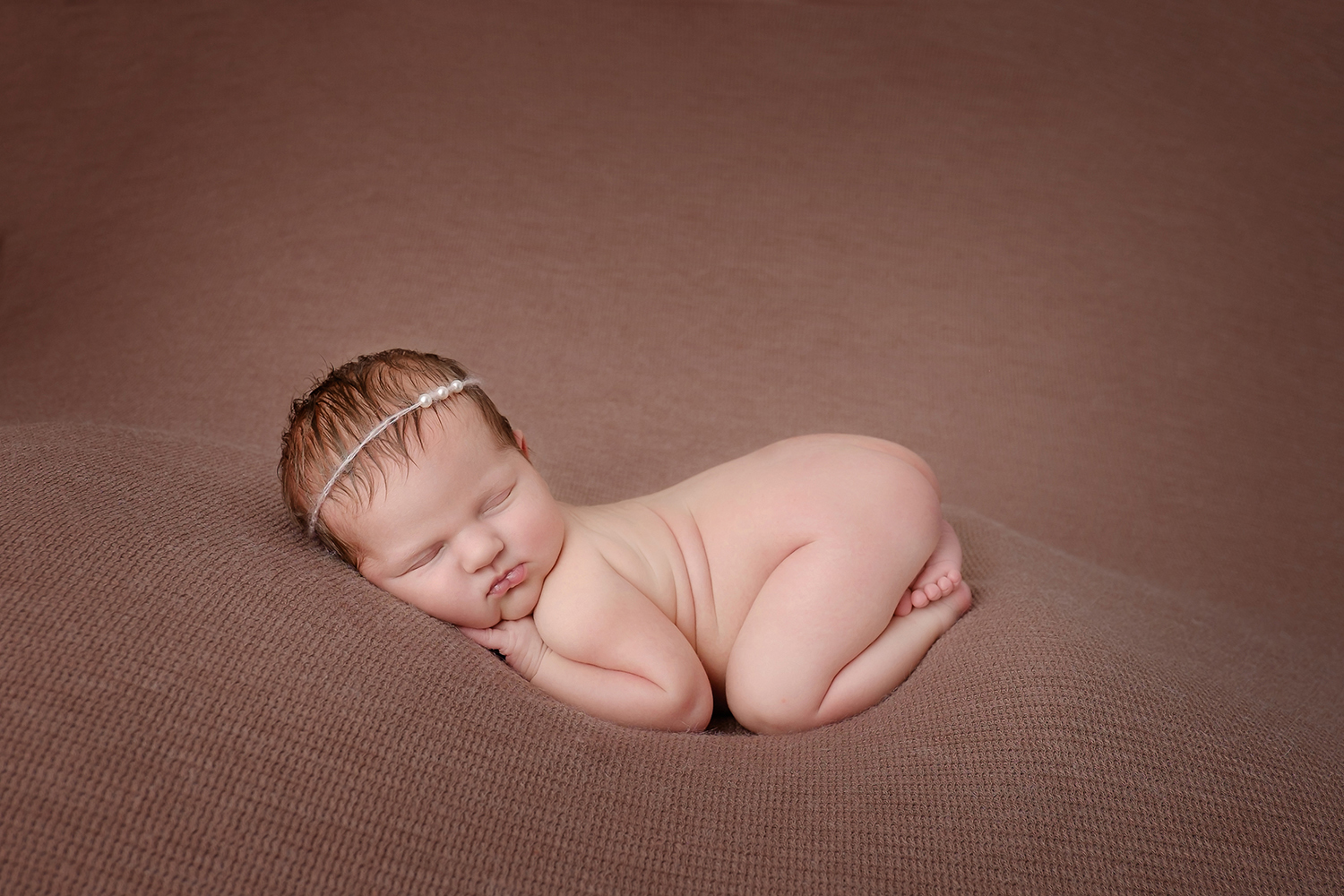
When posing babies on my beanbag set-up I need to stay within close proximity to them so that I am always within arms reach if they were to stir or startle when in a pose. My favourite lens for these images is the 16-55mm as it enables me to get full body shots and also closer crops all whilst staying right next to the subject. I will sometimes use my 35mm too, as I love the extra shallow depth of field I can get when shooting wide open, it helps the blanket backdrops naturally fade off without having to manipulate it in photoshop after.
To help babies settle I often keep my hand on them so they still feel some contact, at around 6-12 days old they aren’t use to being left alone yet, and this is where the X-T1 makes a massive difference to the way I work. It is light enough that even with the 16-55mm lens, I can shoot steadily with one hand, only removing my other hand from the baby just before I take the shot.
The silent shutter is also a winner, once the baby is asleep it’s great to know that there won’t be any heavy shutter clunks to disturb them.
X-T1, 16-55mm, 1/180s, f/2.8
For prop shots I usually use my 56mm or again the 16-55mm zoom. When I shoot against my wooden backdrop the 56mm at f/1.2 gives a wonderful separation between the baby and the backdrop and really makes them stand out. For these shots I do ask a parent to spot the baby for me and they are right next to them, just out of the frame, ready to hold the baby should they roll or startle. On these portraits I tend to use the tilt screen so that I can hold the camera just above the floor enabling me to capture the baby at their eye level which gives a really intimate feel to the images.
X-T1, 56mm, 1/180s, f/2.2
Another set-up I like to do is with the flokati rugs, the baby is all curled up in womb-like pose and I shoot from above looking straight down. With the X-T1’s tilt screen, I stand next to the baby and using a light weight wrist strap, hold my camera directly overhead using the screen to frame the image. Before I moved to Fujifilm I had to use a small step to stand on to be able to compose the same image with my DSLR, it was heavy to hold and I never felt that standing on something near the baby was the safest way of working, so I’m delighted now that the X-T1 lets me work around this easily.
When including older siblings within a newborn shoot I have found the X-T1 to be less intimidating and intrusive to my young clients. It’s not big and menacing like large DSLRs and using live view means I can keep eye contact with them too which makes for a much more relaxed image.
X-T1, 35mm, 1/125, f/2.2
An obvious benefit I felt when swapping to Fujifilm was the improved practicality, after a day of shooting my wrists, arms and back really thank me for the weight difference. I certainly couldn’t have entertained the idea of shooting as freely as I do know, sometimes one handed and frequently over the top of my tiny model.
I love that the settings I tend to change within a session are all easy to access, the ergonomics of the X-T1 have always felt ‘right’ to me, I can twist a dial without having to go hunting through menus. I spot focus and find the D-pad easy to use to toggle my focus points, and the auto white balance seems to do a fantastic job with tricky baby skin tones.
I genuinely do think my little X-T1 combined with the great line up of lenses are the perfect match for my little clients.
Not many people realise it, but before I started travelling and shooting Motorsport, photographing pets was a major part of my business. I would shoot a lot of equine and dog portraits with the odd cat, snake or rat thrown in now and then. I still run Pawfolio, but it’s now more a project of love, or reserved for when people who know me as ‘the pet photographer’ really want me to shoot their most beloved….. not the kids, yep it’s always the dog!
I see a lot of people posting photos of their pets on instagram lately, with some pets even having their own pages. So I thought I would put a few tips together that might be fun to try out if you want to get a great shot of your own pooch…. some of the tips might even work on pictures of the kids too!
For my doggy model, I’m going to use Bria aka ‘The Beast’, my beautiful Sprocker Spaniel. These shots all involve natural light as I wanted this article to be of use to everyone. As long as you have a camera and a lens you can get stunning shots of your beast without expensive lighting.
Preparation
In my ‘Pawfolio’ bag. Don’t panic! You don’t need all of this! this is just some of the equipment I use on various shoots… If you have only one lens and a camera you’ll be fine 🙂
Camera: XPro1, XT1, XT10
Lenses: 18mm F2, 35mm F1.4, 10-24 F4, 90mm F2, 50-140mm F2.8
Lighting: Ambient/Natural Light
Extras: Dog, lead, willing assistant (wife, kid, person you met on a dog walk?), dog treats / squeaky toy / bouncy ball / whistle, silly voice, insurance (if you want to shoot other peoples dogs!), mobile phone
Top Tip! Things become massively easy in life once a dog knows how to sit, stay, and look at food!! this is where all that training pays off! You will need a few basics such as;
Sit, Paw, Down/Sleep, Stay, Come…
(We had to learn some of these commands in polish once for a clients dog we photographed.)
A food-orientated dog is perfect, if this isn’t working then it’s down to the favourite toy, bouncy ball or failing that, making stupid noises…..dogs love this! The right noise will get a dog to tilt it’s head in a way that looks cute but whilst saying ‘what are you doing, human?’
Play with your beast first;
this builds a little trust between the dog and yourself.
It’s fun for both of you,
it burns off the dog’s energy reserve
A few minutes playing around the kit isn’t a bad thing either, it lets the dog know that the camera is nothing to be worried about and not something strange and dangerous…
Around the house – Your own dog
Ideal for practice and often the easiest of images to shoot are where the dog is relaxed in their own surroundings or favourite spot. I normally wait for ‘Beast’ to find somewhere nice to settle or I encourage her to sit roughly in the right place. Quite often I’ll pap her as she drifts off to sleep. These are candid based shots but can turn into gorgeous intimate photos.
I use any of the following 18mm f2, 35mm f1.4 and the 90mm F2 mostly to achieve the shallow depth of field for this type of shot. The XF35mm f2, XF16, XF23 and XF56mm would be amazing also. Any lens at F1.2 – F2 will make a stunning image. I often use the X-Pro1 and X-T1. The OVF on the X-Pro1 can be really useful in hybrid mode during low light if the EVF wont preview the shot.
#Tip – You can put the Fuji camera to silent mode if the dog is too distracted by the shutter sound. Beast used to hear the shutter then pounce on me because she thought the sound meant that the shoot was over.
The candid shots I usually try to get for every dog shoot are:
Nose
That big snuffler is amazing. Shot at 1.2 or on a Macro it makes a stunning detailed image.
Paws
The texture of the pads or the hairy paw is beautiful. If it’s your dog, hold the paw and capture a paw & hand selfie #TooCute
Face
Poor beast with the collar of shame“What’s going on down there?”
Like any face or portrait I shoot, I always focus on the eye closest to me. If you shoot the furthest one and the closer one is blurred, the image just looks wrong – please don’t do it!!
#Tip – Try shooting the dog from ‘a dogs view’ or from below the dog looking up. Crawling around in the dirt is just an everyday thing for me, but I think it’s really worth getting the unusual perspective. This is also now where the flip out screen is genius and the X-T1 or X-T10 becomes king.
That said, don’t rule out the standing up traditional viewpoint. Sometimes if you stand right over the dog looking down, you get that ‘puppy face’ beaming back up at you, and there is nothing cuter.
Outdoors
For outdoor shots, choose a nice spot your dog is going to love and that has some features or atmosphere about it. The beach is an awesome place for dogs, and one of our favourites, with lots of space, great light, and lots of zooming. For this a 90mm, 50-140 or the new 100-400 is ideal because the animal can move around freely but you can still fill the frame. This situation is ideal for the X-T1 or X-T10 because of their high frame rate. I would probably go for the X-T1 more to help keep the sand, salt and spray out of the camera. I would also recommend the weather resistant lenses for this type of shoot. A rogue wave splash or a shake down from the Beast can spray your gear from a surprising distance.
You won’t believe the range on this thing!
Rivers are great too, but always check the current is safe. Look for a spot on the bank with space and great moody lighting, perhaps between some trees. You should make sure your beast can get in and out easily, and I always have someone with me to throw a ball or something safe for the dog to chase, or I sometimes just sit and watch the animal play and have fun on their own.
Before river
After river
My favourite lens for outdoor dog shoots has to be the 50-140 F2.8. With good flexibility and a shallow depth of field at F2.8 there’s always gorgeous bokeh in the background. I try to keep the shutter up between 2000th and 4000th of a second to keep the motion frozen. If the light is changing or the dog is running through light and dark patches, try ‘auto ISO’.
Set the the auto ISO range function to work between ISO 200 and 6400. To control the aperture, try to stay in the range of F2.8 – F4/5.6 or if you want some amazing textural shots and there is loads of light, dial in F8 – F11. Again get low… I have the tilt screen for this, or just get in the dirt and sand and the shots will be amazing.
You could also try the 16-55 F2.8 if you want the shot to be a little more environmental, shoot wide and get more of the landscape in your photos. When you print this type of shot they look great printed large.
If you want to get really creative try ‘panning’ the dog. This is a technique we use on the track to shoot cars at the races. Select a shutter speed between 1/8th (very creative) up to 1/200th (suggest you start there and work your way down to 1/8th), and rotate your body at the hips following and tracking your dog as it runs past. You want to work your shots at slower and slower shutter speeds to create a wonderful action arty shot…
Doggy pan
More about the author
John + Beast
John Rourke has been shooting professionally for 15 years and is the owner of Adrenal Media, the Official Photography Agency for the FIA WEC (World Endurance Championship), and the ELMS (European Le Mans Series) including the world famous ‘Le Mans 24hr’. He shoots all of his professional and personal work on Fujifilm X series cameras.
What’s not to like about macro (close up) photography? Getting closer to your subjects to see them in greater detail will always appeal, so picking up a few techniques to help you get better at shooting close ups is always worthwhile. Before we get down to the picture taking, let’s cover off the basics.
First, to get the best results you’re going to need a macro lens. That doesn’t mean a lens that has a macro setting, it means a proper macro lens. Such optics aren’t only suitable for close up work. The FUJIFILM XF60mm F2.4 Macro lens that we’re using here, for example, doubles as an excellent lens for shooting portraits, but it’s optically engineered to excel at close ups.
When it comes to macro lenses you’ll often hear the term ‘reproduction ratio’, such as 1:2 or lifesize. Put simply, this refers to the size the lens can reproduce what it’s being pointed at. A macro lens that offers a lifesize (or 1:1) ratio will reproduce the subject at the same size on the sensor as it is in real life. 1:2 means the subject will be reproduced at half lifesize, and so on. The XF60mm offers a 1:2 reproduction ratio.
Finally for now, it’s important to know that the closer you get to a subject, the smaller the area that appears in sharp focus. Given this, focusing has to be extremely precise, which is why a tripod or some other form of support is recommended.
Scenario 1: Shooting macro outdoors
With spring just around the corner, it’s obvious to brush up on your macro skills so you can shoot flowers. Indeed, for this very blog, I found a clump of snowdrops in my local park. Shooting macro images outdoors brings a number of challenges. The light levels vary which can cause exposure issues and, on the day I shot, it was windy, which causes delicate flowers like this to blow around a lot. That means you’ll need to shoot plenty of images, so make sure your battery is fully charged and you there’s plenty of room on your memory card.
I used an X-T1 for all these images as the fold out LCD is an absolute godsend. As I was working at ground level, it avoided me having to lay down on the cold ground. Instead, I popped out the LCD and rested the camera on a rolled up coat for support as my tripod didn’t go low enough.
I picked my subject carefully, finding one bloom that was isolated away from a larger group so I could focus attention on it and still get some complementary colours in the background; always check what is behind your subject before you shoot.
The first shot I took (above) was with the XF18-55mm set to 55mm and at its closest focusing distance. To be fair, this isn’t a bad result at all, but doesn’t really have a huge amount of impact as the bloom is quite small. So I reached for the macro lens and took this:
It’s a big improvement with the bloom occupying more of the frame, but the light is a little flat, so I used a small silver reflector placed under the snowdrop to push some more light in and get an even better shot:
I could have stopped there and been happy, but I also had the FUJIFILM MCEX-11 and MCEX-16 extension tubes with me, so I gave them a try. The tubes fit between the lens and body and allow you to focus even closer. Both tubes maintain all functionality between lens and camera including autofocus, but the focus can hunt a little more and as I was getting so close to the snowdrop I opted to switch to manual focus and use Focus Assist to enlarge the subject on the X-T1’s rear LCD for focusing accuracy. AF hunting isn’t the end of the world, but means you can end up with shots like this where it’s focused on the background rather than the single bloom.
I took three further sets of images, one with the 11mm, one with the 16mm and then one with the two combined, which got me closest of all. The reflector stayed in place for each image, but the sun was in and out hence the variations in light levels. Take your pick!
11mm tube
16mm tube
11mm and 16mm tubes together
Scenario 2: Focus stacking indoors
Time to warm up and head indoors to try another macro technique: focus stacking. Here, you take a range of shots with the lens focused on different parts of the subject before using Photoshop to stack them all together and get one super sharp image.
As previously mentioned, the closer you get to the subject, the smaller the zone of sharp focus so it can be difficult to get the image sharp from front to back. One solution would be to put the camera on a tripod and use a small aperture. But this could make for a long exposure, plus lenses aren’t always at their optical best at smaller apertures. It’s better to pick a central aperture – here I used F5.6 – and stack the images together.
To make this technique work, you’ll need something called a focusing rail. This attaches to your camera and allows you to make precise incremental changes by using the measure on the side of the rail. I used the 454 Micropositioning Sliding Plate by Manfrotto. I attached this to the X-Pro2 and XF60mm with MCEX-11 extension tube I was using inside, then put both on a tripod and framed up my subject – a dusty snooker scoreboard. In case you wondering why I didn’t remove the dust, this is purely to show how much detail you can get using the stacking technique.
With the XF60mm set at F5.6 and manually focused on the number 9, here’s the result I got (above). The 9 is nice and sharp, but the in focus area soon drops off on either side. Next, I didn’t touch the focus on lens and moved the focusing rail until the point nearest the camera came into focus. Noting the distance on the rail, I took a shot. I then moved the rail until the furthest point from the camera into focus and took another shot. Again, nothing on the camera was changed and I noted the distance on the rail.
The distance between the two focus points needed the rail to be moved by 4cm. So, again, by not touching any settings on the camera or lens, I moved the rail incrementally by 2mm at a time and took further shots. This gave me a total of around 20 images. Shooting over, I went to my computer and fired up Photoshop.
Nearest point
Furthest point
I opened all the files at once in Photoshop and then chose File>Scripts>Load File into Stack then on the dialogue box that opened, I chose Add Open Files and OK. With this complete, I then opened the Layers palette in the resulting image and selected all the Layers before choosing Edit>Auto-Align Layers. Once this was complete, I then selected all the Layers again and chose Edit>Auto-Blend Layers. On the resulting dialogue box, I chose Stack Images and then hit OK.
Depending on how much RAM your computer has, these processes may take a while, but once Photoshop has weaved its magic, you should find a sharp image where all the frames are stacked together. There is a possibility that your image will have some odd overlapping elements caused by the slight variance in camera angle between each frame as you move the camera along the rail. In this case, I did, but I was able to crop in slightly to removing the offending areas. If that’s not an option, you’ll need to try a different subject matter and preferably shoot on a plain background such as white or black.
If you’re happy with the result, finish by choosing Layer>Flatten Image and you’re done!
So there you have it – macro in a nutshell. One final point to bear in mind, macro photography is time-consuming to get right. Don’t expect great results straightaway, although there’s little doubt that patience will be rewarded. So when it comes to macro ideas, think big!
If you are like me, knowing what shutter speed to use when you are trying to capture a particular type of action can be confusing at times. So I’ve put together a little ‘cheat sheet’ to help you get a good idea as to which shutter speed to use for particular shots.
In terms of how to use this ‘cheat sheet’ I recommend you print it off, stick it in your camera bag and, whenever you get a chance to shoot something more tricky, have a look at it and try out the relevant shutter speed. Alternatively, find yourself a willing volunteer to practice with!
Before you get started; Put your camera into ‘Shutter priority’ mode; to do this set your aperture setting to ‘A’, the ISO setting to Auto and moving your shutter speed dial off the ‘A’ position. This ensures you only need to worry about the shutter speed that you choose and nothing else.
Important tip! As a good rule of thumb, always use a focal length that is equal to or less than the shutter speed when not using a tripod – this will help against unwanted blur in your images. For example if the shutter speed is 1/30, you should shoot with a focal length of 30mm or wider (28mm, 18mm, 16mm etc).
Walking fast at 1/250 to freeze motion
Walking fast at 1/15 for motion blur effect – panning the camera with the subject
Walking fast at 1/4 for motion blur effect – camera on tripod
Important tip! If you find that using a slow shutter speed makes your image overexpose consider shooting with an ND filter or shoot at sunset/sunrise.
These are just a few examples to get you thinking about which shutter speed to use – the cheat sheet should assist with other types of shots.
The most important thing to do is just go out and try them, don’t worry about getting it wrong and blurring your shots, as over time with practice you will start to get the shots that you were hoping to get.
If you have a friend that is interested in photography go and learn this with them. You can bounce ideas off each other to create some great shots. And… you can get them to perform star jumps for you until you get them perfectly sharp and in focus!
In this tutorial I wanted to give you some of my favourite tips to get you started with landscape photography from the more obvious tips to some of the lesser known ones. I have not listed them in order of importance as I believe this is subjective, more so the order in which they came to mind.
Remember, you don’t have to apply any or all of these ideas to take a great landscape picture, but it may just help you on your way.
Shoot Raw
Although Fujifilm JPEGs are renowned for their quality, when shooting landscapes I strongly recommend that you shoot RAW. This is because more image ‘information’ is retained in the image than from a JPEG and this will allow more flexibility when correcting exposure, enhancing colours and boosting tones. RAW files can be processed & converted with the camera specific bundled software or you can use popular programs like Adobe Lightroom, Capture One etc.
Essential accessories you may have overlooked
When you’re going to be standing in the dark on a misty morning up to your kneecaps in mud there is nothing worse than not having the right gear to keep you warm and comfortable; after all, you may be out for a few hours in these conditions. Here are some accessories that you might have overlooked taking with you:
Wellies – May be obvious for wearing in marshland environments but also extremely helpful on the beach (where you might normally associate wearing sandals)
Headtorch – When going out to shoot a sunrise, finding the perfect location can be really hard if you cannot see where you are going. Make sure that it is a headtorch rather than standard torch to keep your hands free for more important things.
Strong windproof umbrella – When shooting long exposures it is vital to keep the camera as still as possible. A tripod is a must-have accessory but I’d also recommend using an umbrella to keep strong winds from hitting the tripod & camera during these long exposures. As an obvious bonus it will also keep you dry, which is particularly important if you need to switch lens.
Waterproof jacket with zip-lock pockets – Not just to keep you dry, but more importantly to keep useful camera accessories close to hand. Things like spare batteries, remote release cable, cleaning cloth etc. Whether dawn or dusk, when the sun rises or sets it happens very quickly and this is exactly when you want all accessories within easy reach.
A further tip is to keep as much gear in your car boot at all times. That way in your daily travels if you see a beautiful landscape, you can just jump out whatever the weather, walk cross-country across muddy terrain and have a much more enjoyable experience.
Think about composition even when you don’t have a camera with you!
Training your eye to ‘see‘ the best possible shot is probably the most important skill you could hone. The key point here is to imagine the frame of your camera whenever you see something beautiful. Think about all aspects of the shot; where would you stand to take the picture? Where would you position the tree/boat/sun in the frame? What lens would you choose and why? What aperture might you select to impact on the depth of field?
The more you ask yourself these questions, the quicker you answer them too. This means when you actually go to take a picture, you might just get it perfect first time round.
When you find a nice landscape location, try every conceivable angle you can think of until you get ‘that shot’ that brings a huge smile to your face. If that means getting down on your hands and knees, let it happen. After all, the picture you take could end up being your favourite of the day, month or even the year. And don’t be afraid to try an angle, look back at the image and think ‘That was no good’ because it is all about learning what works and what doesn’t.
Remember, the more you experiment, the more ‘mistakes‘ you make, the quicker you will find your own style and know what works for you. Here’s a shot I took that ruined my jeans and shoes, but to me, it was worth it!
Use ND grad filters
You may have heard the term ‘ND grad filter’ or ‘Graduated neutral density filter’ but not necessarily known what it means. Think of an ND grad filter as a pair of gradient sunglasses (the ones that go from dark to transparent) for your camera lens. Its job is to stop a specific amount of light from reaching the sensor of your camera – but why would you want to do this?
Well, when you look at a sunset with the human eye, you can see all the detail in the lights of the sky and shadows of land without any problem. Unfortunately, even the best cameras cannot do this as well as the human eye can. Therefore to try and get the best reproduction of what the eye can see the camera is going to need a little help.
This is where the ND grad filter comes in. By choosing the right strength ND grad filter and positioning it correctly in the frame, you can perfectly balance the exposure above and below the horizon to give a stunning image that is colourful, full of tonal detail and a much truer representation as to how you saw it with your own eyes.
Your next question may be which ones should I buy? Or how exactly do I use them? My recommendation is to read forums, ask other photographers and watch videos on YouTube to get a good understanding of the best practices to ensure great results.
Check the weather
Even within small regions the weather can vary quite a bit. You may find that location A is raining in the morning but location B is not. Use this information to your advantage, amend your itinerary to get the very best out of your day. There are lots of free weather apps for smartphones out there so have a look around to find one that suits you best.
Prepare an itinerary
When you go away on a specific landscape photography trip, take the time to plot out the locations you want to visit, what times you want to visit them and how long you will spend at each location. Although this sounds very regimented it will help to keep your trip on track. Of course, if you find one of the locations particularly beautiful stay there longer, enjoy the experience. Simply think of the itinerary as a check list or a guide to get the most out of your trip as possible.
Find the sweet spot for your lens
Getting the best out of your lens is important, especially in landscape images. Now if you are looking to get as much in focus as possible in your photo, simply set your lens to the smallest aperture available (which is the largest number) for example: f/16 or f/22. But if you are looking for the sweet spot of your lens (where it performs best in terms of clarity and sharpness), this is usually around 2-3 stops from the maximum aperture of the lens (which is the smallest number) for example: if you are using the XF14mmF2.8 lens then you expect to see the sweet spot at around f/8 as this is 3 stops from f/2.8.
Here are some other examples:
Lens
Maximum Aperture
+1 stop
+2 stops
+3 stops
XF14mm
f/2.8
f/4
f/5.6
f/8
XF10-24mm
f/4
f/5.6
f/8
f/11
XF18-55mm
f/2.8*
f/4*
f/5.6*
f/8*
* at 18mm
It doesn’t mean that you have to abide by this rule of thumb but it can help you find the best quality from your lens quickly. If you find some spare time, I would recommend setting the camera on a tripod, take the same picture on a few different apertures with the same lens and then look back at the results – find an aperture that gives you the perfect balance between depth of field, sharpness and image quality. Once you know what it is, use it as a starting point when out and about taking shots.
Is there a ‘right’ hour to shoot landscapes?
One of the first tips to help capture better landscape images is to shoot at the ‘right‘ time of day. The golden hour is widely considered as the ‘best‘ time of day to take a landscape image. It is the hour in which the sun is rising or setting. This is due to a number of reasons but the main ones being the rich warm colours in the sky and the long trailing shadows that are created.
Don’t think that the only time you can take great pictures is at golden hour however, so many stunning images have been created at all times of day. Just think of it as a good starting point.
Extra tip: The time just before a sunrise or after a sunset is a great opportunity to take pictures too. This is known as the Blue Hour, it is called this because the indirect sunlight creates a blue hue in the sky and can help produce some of the most beautifully natural subdued tones.
Example image of the blue hour
The Photographer’s Ephemeris (TPE)
This is one of the most useful tools in a landscape photographer’s bag of tricks. It is a third party application map-centric sun/moon calculator that shows how the light falls on the land. This allows you to know precisely where the sun is going to rise/set in a specific location way ahead of actually being there. It can come in handy when creating your itinerary as you can plot out the suns movements across a virtual map. The application is available on desktop, iOS and Android devices so it can be taken on-the-go as well.
When shooting any image it is very important to maximise the amount of detail captured from the lowlights to the highlights. This is especially the case with landscapes due to the difference in the exposure between the land and sky. You can use your eye to judge whether an image is overexposed or not when it is very obvious, but I strongly recommend you use the camera’s histogram to tell the full story. It will allow you to make much smarter decisions when deciding the best exposure for the shot.
You may or may not know that when the highlight details in a scene are overexposed and burned out they are impossible to recover and get back regardless of how good you might be in post-editing. This could mean white blobs in the sky instead of detailed clouds or white mass areas in the sea instead of crashing waves etc.
So how do you avoid it? Well, shoot RAW (to maximise post production flexibility) and then look at your histogram. You want to aim to get the bulk of the histogram information to sit on the right hand side of the scale – this is known as exposing to the right. The most important part of this technique to ensure that the trace of the histogram does not peak right at the end of the right hand side as this would mean the highlights have been lost / burned out. An easy way to adjust this can be to use the Exposure Compensation dial / button found on the camera and decrease the exposure in 1/3EV at a time and then recheck the histogram until it looks perfect.
Don’t panic
Making mistakes is a natural part of learning any skilled craft. Accept that you are going to make mistakes along the way. You may take blurred shots, blow the highlights to kingdom come and delete your favourite image from the memory card by accident, but in the end, with practice, you will be a creative machine that can make beautiful images wherever you are, whatever time of day and with any camera & lens combination. Enjoy the journey and don’t panic, it will happen.
As with any tutorial there is always more that could be said, more tips that could be shared but the idea here is to give you a good starting point which you can grow from. Ask questions with other photographers, search tutorials online, share your images and ask for constructive criticism, look at work from inspirational landscape photographers and most importantly, enjoy photography.
As I took the final few steps and reached the peak of the hill, the Himalayas came into full view for the first time, and left me speechless.
But let’s begin the story several hours earlier.
I had been staying in Dharamkot, in the foothills of the Himalayas, for an incredibly relaxing 2 weeks. My days had been spent walking through beautiful forests, reading in a hammock and eating delicious organic food.
A monk walking through the forest in Dharamkot
But before leaving Dharamkot, there was one thing left that I had to do; spend a night on Triund Hill (don’t let the name ‘Hill’ fool you, as for me it seemed more like a small mountain, casting a shadow on the village of Dharamkot and standing at 2,875m high).
On the morning of the trek I left my guesthouse and began the ascent up the hill. The beginning of my trip did not go smoothly. There are 3 things in life which I suck at: singing, playing football and following directions. Somehow, I managed to get exceptionally lost – before I had even found the path which takes you up the hill. The problem began when I came to an intersection along the track which I was following. I glanced in both directions as I tried to remember the directions that the lady at my guesthouse had given me, and then took the path leading to the right. I passed through the garden of a house, and asked a young girl if I was walking in the right direction. She said that I was, and gestured to me to continue walking up the side of the hill (which was essentially a pathless mountain covered in thick, and at times impenetrable vegetation). My instincts told me that this couldn’t be the right way, and I debated turning back and starting again, but as I had already been walking uphill for most of an hour I chose to continue up the side of the mountain.
The bush became thicker and thicker and started cutting at my legs, but stubbornly, I refused to turn back. After a long struggle, I eventually crossed a foot-wide, crumbling flint ridge, which then opened into an area of flat ground which I thought offered some hope in leading me to the top of Triund. I carefully paced back and forth through the labyrinth of plains, but I kept facing dead ends; thick wild bushes that required a machete to pass through. After about 20 minutes of trying to find a walkable route, I decided that this had been one big bad idea, and turned around, attempting to retrace the steps that had led me to this next level of lostness. I walked along the ground on which I thought I had trodden, but to my frustration, I was hit by another dead end. I walked back and tried again and faced another dead end. I began to panic as I remembered those basic tips you hear when doing things like walking up a mountain. Things like “tell someone where you’re going”, “make sure you have a phone” or “make sure you are wearing appropriate clothing”. I hadn’t told anyone where I was going (other than the lady at my guesthouse), I didn’t have a phone and was wearing a pair of old beat up Nikes with barely any tread left.
It was one of the first times when I’ve felt truly scared and alone in the wilderness. I thought about how this is how people probably end up dying on mountains, and became annoyed at myself for getting into this situation. I was frustrated, scared and felt defeated. I decided that as soon as I found my way out, I would check into another guesthouse (as I was too embarrassed to return to the guesthouse where I had been staying – as it was supposed to be an easy trek), spend the night in a bed, and then leave Dharamkot the next day without reaching the top of Triund Hill.
On the left of the image is the path I took. Clearly not the right way.
I knew that I had to remain calm, and took a few moments to recompose myself and look over the way which I thought I had walked. I tried to logically plan a route back to my starting point and to my relief, I eventually came across the narrow flint path which had led me into the labyrinth. From this point, it was easy to return down the side of the mountain and past the house with the garden.
I finally relaxed and felt an extreme sense of relief. My negativity began to lift as I walked towards familiar territory and came across a path which actually looked walkable. I came to the crossing that had been the origin of my nightmare, and after a few meters saw a spray painted sign reading ‘Triund’, with an arrow next to it. After my brief ordeal of getting lost, I finally felt safe again, and made the decision that I would not return to Dharamkot today, but would trek to the top of Triund Hill.
I soon crossed paths with two American girls who were also walking to the top, and shared the journey with them. The trek to the top was a breeze in comparison to my first attempt. The walk took about 3 hours and took us though some incredible scenery. Hand built wooden Tea shacks were dotted along the route where trekkers could rest and stock up on supplies. Occasionally we would have to squeeze to the side of the path as a drove of donkeys passed, hauling supplies to the top of the mountain.
Walking up the mountain. A tea shack in the top left of the frame.Donkeys hauling supplies to the top of the hill.Tea with a view; trekkers rest at a tea shack on their way to the top.
After a few sweaty but exciting hours, I approached and took the final few steps over the peak of the hill, and as I did, the Himalayas came into full view for the first time, and left me speechless.
I was extremely satisfied with reaching the top, and after walking along the ridge of the hill taking in the beautiful views, I needed to organise my night’s accommodation as well as get something to eat. I entered one of the few huts at the top that supply tents and food to tired and hungry trekkers. As I rested and ate a snack there was a middle aged man sitting opposite me. He was smoking a cigarette and had an incredibly interesting face. His looked different to most of the Indians I had seen until then, with light eyes and thick skin. My X100s was in my hand and after a few minutes, I began taking photos, firstly of the hut and the area, to allow him to get used to the camera. After a few frames, I gestured to him to ask if I could photograph him. He agreed and continued doing what he was doing, and looked lost in his thoughts. I shared my food with him and then left, as I didn’t want to be intrusive.
The goat herder in the tea tent.
I hired a tent, found a clear spot on the ridge and set it up. My view overlooked a part of the Himalayan mountain range. I was blown away by the beauty.
A room with a view.
The mist that was present as I approached the peak subsided and the golden light of the setting sun began to illuminate the mountain. I became excited as I was basically in landscape heaven and everything I saw looked astonishingly beautiful.
I decided to take advantage of the golden light and explore the length of the ridge. As I passed the other campers and approached the elevated side of the hill, I could hear the bleating of mountain goats in the distance.
I continued walking up the hill and came across the goats. There were lots of them, grazing and playing on the rocks. I enjoyed quite some time taking pics of them. They were very fun and cute to watch and I found their noises very entertaining.
After a few minutes I saw the man from the hut. I now realised that he was tending to the goats, and had taken them to the other side of the ridge to graze. He had made a fire and was drinking chai tea. He had seen me taking photos of the animals and after a while I approached him with a smile. He invited me to sit down and poured me a cup of tea. With few words being spoken we shared each other’s company, and again, he allowed me to take some photos of him. He seemed extremely peaceful.
Sharing tea with a goat herder
The sun was going down behind the mountain and I was excited to carry on shooting. I shortly came across another animal herder, this time a man who was shearing some of the goats.
A herder shearing his animals
After maybe an hour with the goat herders, I walked back down the hill as dusk approached.
On the horizon the reddest moon that I have ever seen began to rise. I watched in astonishment as it peaked over the mountains and into the sky. I chatted to fellow trekkers about the colour of the moon.
The blood red moon rises over the mountains
As night fell, small bonfires lit up the hill to keep the trekkers warm. I joined a group of Indian guys around the fire for food and tea, but decided to get an early night as I knew I wanted to be up before sunrise to take photos.
Trekkers keeping warm around a fire.
After a pretty bad night of rest (due to a lack of warm clothing) I crawled out of my sleeping bag, unzipped my tent and walked into the fresh mountain air. It was still quite dark as the sun had not yet began to reach over the mountain top. I decided to walk to the far end of the ridge that I hadn’t ventured to the day before. I had my mini tripod with me and began taking photos. In a distant tree I saw a huge eagle, which was another first for me. After about 40 minutes, I heard the familiar bleating sound that I had heard the day before coming from behind me. As I turned around, I saw lots of goats (perhaps more than 100) running and jumping towards me. This instantly made me smile and as they ran past me, I climbed onto a rock so they could pass without knocking me down. The goats raced past playfully.
It was around this time when the sun began to appear over the mountain, bathing Triund Hill with glorious golden light, which also brought a warmth to the brisk mountain air.
I followed the herd of goats and whenever possible, climbed upon a rock to get a better view of the scene. There were different goat herders from the previous day, and I followed them along the length of the ridge, snapping away. As the other trekkers were sleeping, I was grateful to be witnessing this unique moment and felt invigorated to be there.
The walk along the length of the ridge took about 30 minutes, and on my part, it was a process of running ahead, stopping, shooting, and then running ahead again. These leap-frog manoeuvres lasted until we reached the elevated end of the ridge.
I gestured to one of the herders with my camera, and he stopped for a moment to allow me to take his photo.
A portrait of a herder.
After reaching the high end of the hill, the herders stopped and allowed their animals to feed. I thanked the herders and returned to the camp feeling extremely grateful and happy with the events that I had just seen.
After some breakfast, I began my descent back down Triund Hill, with extremely high spirits (and an increasingly swollen ankle – which later turned into an infection). My experience on top of the hill was fantastic, and reminded me how nice it is to be surrounded by nature and simplicity. I’m so glad that I didn’t give up on the trek after my bad experience at the start, as Triund Hill proved to be one of the most memorable events of my trip.
—
About Danny
Danny Fernandez is a creative photographer living and working in Barcelona. He likes cycling, records and vegetarian food.
To see more of his work, please visit:


 By
By 


