Ben is an environmental photojournalist, zoologist and Fujifilm X-Photographer. His passion is showing the beauty and fragility of the natural world. Find more of his work at www.bencherryphotos.com
Following on from the last blog that covered what gear to use for wildlife photography, I’m going to explain how I set up my X-Series cameras for capturing action. Though some cameras are better than others for this type of photography, there are little ways to help yourself help improve your chances of capturing action.
High burst rate
Though using a high burst rate will eat through your memory cards space, shooting at a high frame rate will hopefully get a good selection of action shots.
Auto focus
First of all make your focus point as large as possible: do this by pressing the AF button and zooming out as far as you can. With a moving subject it will be very difficult to keep the subject in a small selection zone, so give yourself the best chance possible. Continuous focus (This applies to the X-T1 and X-E2 as they have vastly improved continuous AF functionality) is really helpful with certain subjects, especially if they are coming towards you. For those of you with models that are best in single focus mode, fear not! Generally the Fujifilm lenses are quick to auto focus so if you’re following a subject you can focus, take a shot and then focus again or alternatively prefocus if you know where the subject it going to go. Some photographers use cameras in MF mode and use the AFL/AEL button to focus. This is helpful because you can then use the manual focus ring on the lens and see what is in focus via focus peaking. Experiment and see what method works best for you.
This sequences was taken using the X-T1’s tilting screen and the XF56mm at F2.8.
ISO
My standard ISO setting is 800. To some this might seem high but the output from this is so clean that it isn’t a concern for me. If it’s a bit cloudy and I’m wanting to freeze the action I’ll push my ‘ready’ ISO to 1600. My philosophy is that it is better to have a sharp image that might be slightly noisy as you get up to than an image that might have some motion but has less or no noise.
A blue shark close up taken at ISO 1600
100% close up – In my eyes the noise (or lack of it) is not a problem at ISO 1600
Aperture
For action photography you have to decide if you want to freeze a moment, capture the motion or something in the grey area. If you want to freeze the action you’ll generally want to use a wider aperture to get a sufficiently high shutter speed. The shutter speed required to freeze depends on the pace of the action, and your chosen aperture is determined by the light conditions and your ISO choice. The thing to remember is that shutter speed, aperture and ISO are all intertwined. If you want to read more on apertures then read this previous blog (it contains puppies!). If you want to focus on one, say a faster shutter speed, then this has an adverse affect on the other two factors. If you’re wanting to freeze the action with a fast shutter speed AND also have a large depth of field then you have to increase the ISO. It is also about prioritising the most important factor for you and then compromise with the others. When aiming to freeze the action I am generally in aperture priority mode, where I have set the ISO according to the conditions (usually over 800), and I then choose an aperture to obtain the shutter speed I want.
Taken at 1/3800 sec, F5.6, ISO 800
If you want to capture motion blur, say through panning with your subject, then your shutter speed is having less of a constraint on your ISO and aperture so you can change these accordingly to reduce your shutter speed. One way to control this is through shutter speed priority, where you set shutter speed to what you want and then have the aperture in auto mode so it will change to keep the same low shutter speed (with the ISO previously set).
Taken at 1/13 sec, F16 ISO 200
Finally, another set up option for action is to set the aperture and shutter speed to what you want and then have the ISO in automatic mode. You could go fully manual but I find this can quickly lead to problems when trying to capture action, especially if there is a lot going on around you. This method can result in you missing fleeting moments.
Now that you know some action set ups go out and shoot! Let us know what your action set up is with the X-Series and share with us your action shots via our Fujifilm’s Facebook and Twitter. As ever, if you have any questions then please leave a comment below or contact me via:
As winter starts to set in, photographers are looking for ways to capture this cold season. For me, winter is best covered in the morning. This is a personal preference but in the mornings you have frost, a reasonable hour for sunrise and (if you’re lucky) fog or mist.
There are three types of fog, so you need to decide what you are looking for and this will depend on your location:
Ground fog – In mountainous/hilly areas and cold patches you can get ground fog collecting in valleys. After a rainy night or over wet ground you can get shallow precipitation fog.
Sea fog – Also called advection fog, this is where warm air passes over cold sea water.
Sea/River smoke – Where the air is colder than the water, creating a generally shallow level of fog, this is generally restricted to water areas, hence river smoke.
When trying to photograph fog you need to use the weather forecast to understand what the evening will be like in your desired location. I was fortunate enough to visit Curbar Edge in the Peak District the afternoon before my first morning I was there to scout the location. It was just before sunset and the fog was forming in the valley below and at that point I decided to try it out the following morning to see how it would look.
The weather for my first morning at Curbar was drizzling and there was a thick layer of cloud, which meant it was pretty unlikely I’d witness much golden light, I thought I’d set out and give it a go. I am so happy I did! This was my first real experience of photographing mist and it is incredible how quickly the spectacle evolves in front of your eyes. I one point I was photographing down one end of the valley, taking some long exposures, only to look over my shoulder and see that it had dramatically changed down the other end of the valley!
I used the X-T1 and the XF18-135mm lens for my main set up. As it was a wet morning the weather-sealed kit meant that I could stop worrying about the system and focus on the spectacle. As well as offering weather sealing, the XF18-135mm meant that I had great versatility, meaning that I didn’t have to worry about changing lenses the entire time. However, I also ended up using a neutral density filter to reduce the amount of light reaching the sensor to further extend the shutter speed. This was great but because I was using a filter set instead of screw in filters it meant that the front element was exposed to the conditions. Long exposures and rain drops do not mix! Thankfully a little umbrella tucked away in my bag helped to shelter the filter.
Generally I was not bothered about using a fast/moderate shutter speed so I set up the system on a tripod and used ISO 200 (the lowest RAW compatible ISO) and generally around F8. The addition of the ND filter, which was a 10-stop filter, meant that the shutter speed required was dramatically decreased. This results in the mist smoothing out, giving quite an interesting effect. See the comparisons below (note that despite the fact the ND filter is meant to be neutral it has put a distinct colour cast on the images).
0.6 sec
125 seconds
1/13 sec
58 seconds
1/10 sec
58 seconds
The ND filter extended the shutter speed so much that I had to use the bulb setting, as the required shutter speed was longer than 30 seconds. For this I used the remote trigger that allowed me to hold down the trigger (lockable) to keep the shutter open for as long as required. The X-T1 shows the length of the shutter speed on the back screen, this is very helpful. There is something to consider thought when using long exposures: the processing time. As soon as you go beyond 30 seconds, the processing time dramatically increases from seconds into minutes, this isn’t a problem but is something to be aware of when trying to photograph a scene that is evolving constantly.
To make sure I didn’t miss any moments while the X-T1 was processing and to get some different shots, I used the X100s with ISO 1600 to produce a fast enough shutter speed to allow me to use the camera one handed. Picture the scene: a wonderful valley filled with fog unfolding in front of me, one camera on a tripod; my left hand sheltering it with an umbrella; photographing the scene with the X100s in my right hand at the same time! Who says photographers can’t look cool…
The three above photos were taken with the X100s using the monochrome + red filter jpeg preset.
The reason I chose Curbar Edge is because it provides a high vantage point. This is really important to optimise your chances for good mist photography. It generally means that you should be hit by the early morning light and so should warm up faster! This is a valid point to consider on crisp winter mornings, not that it happened this time around. A high vantage point allows you to see for a greater distance, hopefully providing you with a greater number of layers to your picture. At the top of a valley, Curbar Edge allowed me to see for miles along the valley, which offered both valley fog and river smoke. The ability to then use a telephoto lens to zoom in on particular areas can result in some quite striking shots.
But also having the ability to instantly zoom wide was a great asset to try and obtain a variety of photographs.
The colour photos were all taken with the X-T1 and I used the Classic Chrome camera calibration in Lightroom which produced wonderful colours in my opinion. I have only just started using this camera calibration and I love it.
Though on this occasion the sun didn’t break through the thick cloud cover, the spectacle was nevertheless remarkable and I can only imagine what it would have looked like if sun rays had broken through.
The second morning
Despite being very happy with the previous morning I decided to give it another go as the forecast suggested there was a better chance of a proper sunrise. This time round I decided to not focus too much on lengthy shutter speeds, but instead the details in the fog. What I didn’t expect was the amount of fog!
The range of the 18-135mm meant that I could capture the grand scale of the fog at 18mm, with the car in the first of these pictures giving a sense of scale. Then using the longer end of the lens I pulled out particular parts of the landscape, such as the little cottage that looks like it should be in Harry Potter and the hilltops surrounded by a sea of fog, turning them into islands. As well as the incredible amount of fog, the sun did make a bit of an appearance too. Despite this it was a very cold morning, producing a wonderful frost. I was very happy to have packed a hat and pair of gloves.
I positioned myself so part of the hilltop was between me and the rising sun, creating a backlighting effect on Curbar Edge, which brings the fog alive.
Because of the brighter sky this time round I needed to use a ND gradual filter, where unlike the filter I used during the first morning, this one changes from one end to the other, as the name suggests. At one end it is darker (you can buy filters at different stops, depending on how dark you want to make part of the image), while at the other it has no effect on the light. I use these when I am photographing something with a sky that is much brighter than the ground below. With the above image I used a filter which didn’t stop down the light enough to correctly expose the sky but I like it nevertheless because of the frost (it get particularly difficult to expose correctly when the sun is in the image). While the picture below is a slightly better example of a ND gradual filter in use.
I hope this has proved helpful and now it is your turn to get out there and photograph the wintery conditions. Let us know how you get on.
I thought this could be a helpful blog series for individuals looking to invest in equipment with particular interests in mind. This blog series will hopefully cover gear and techniques to help those getting into photography, who want to develop their skill set and knowledge. Because one of my main subject matters is wildlife I thought I’d start off with this genre.
Wildlife photography is a genre that can massively benefit from having suitable equipment, in my eyes more so than many other photography genres (but I’m biased!). To that end it’s good to be prepared with the most suitable gear for the task.
Best Camera – X-T1
The X-T1 has a number of features that make it the most suitable camera for wildlife:
Knowing that my X-T1 and 18-135mm lens set up was weather sealed meant that I could stop worrying about splashes and focus on capturing the dolphins.
First of all it is a weather sealed camera, so when used with a weather sealed lens you have a completely sealed system which is important when outdoors if you’re having to counter water in wet conditions or dust in dry conditions.
Then there is the fast auto focus, which the X-T1 is definitely the best at in the X-Series at this moment in time. The auto focus is very quick in single focus mode with basically every lens available and the continuous focusing mode is also very reliable and quick once focus has locked.
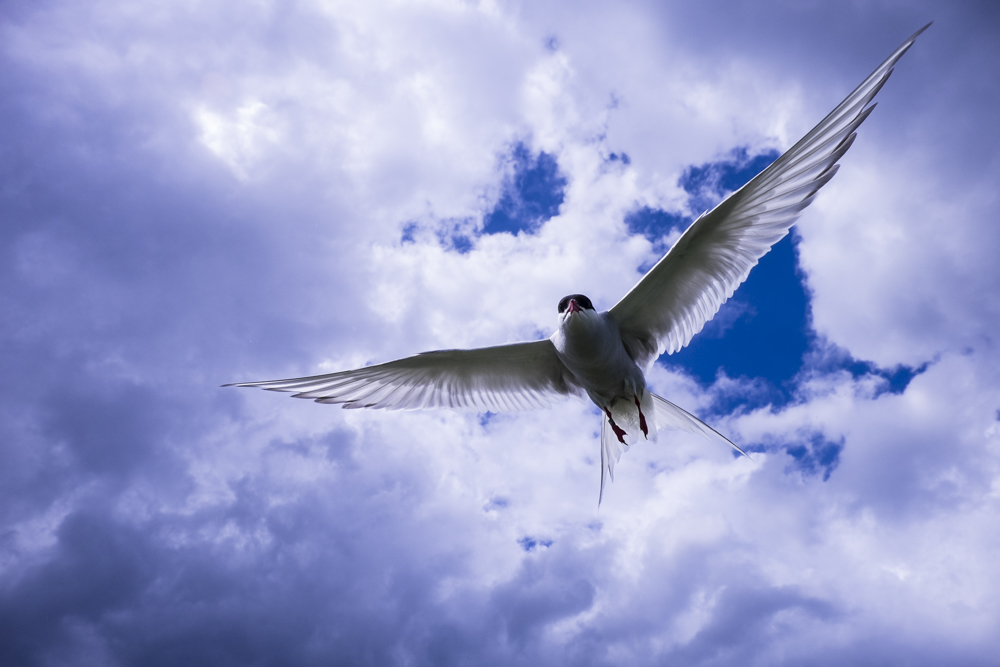
Fast continuous focus and 8 frames per second meant that I could get the composition just right as these terns flew at me on the Farne Islands.
Being able to shoot at 8 frames per second and take advantage of the latest UHS-II SD cards for fast writing speeds means that this camera can cope with quickly evolving situations where you need fast bursts to capture the action and to be quickly ready to repeat the process.
As well as the camera being great, the accessories can be really helpful, namely the battery grip. Often with wildlife photography you are out and about for many hours and the last thing you want to happen is to be stuck changing batteries just as something exciting is happening (this has happened to me far too many times!). The battery grip holds an extra battery so doubles the time before you need to change your batteries.
Finally, the big thing about to come to the X-T1 (black version) is the electronic shutter. Being able to shoot at up to 1/32000 second is great but is generally not necessary for the lenses used with wildlife photography; but what will be very beneficial is the silent shutter. If you’re close to wildlife or in ear shot then even the slightest sound can set off a timid animal. The X-T1 shutter is by no means loud but certain animals have such finely tuned hearing that the mechanical shutter sound can be enough to scare off your subject.
Back up camera – X-E2
Having two cameras is a good idea for wildlife photography. It is often helpful to have two different lenses on the cameras so you can quickly capture images at different focal lengths, going from the close up headshot to the animal in environment shot. If an X-T1 is out of the question, let alone two of them, then the X-E2 is a brilliant compromise. It offers a more affordable option and though it may not have weather sealing and all the bells and whistles I mentioned above it is still a very capable camera. With 7 frames per second and a hybrid AF system that includes contrast and phase detection, this camera is able to capture fast paced action almost as well as the X-T1.
Lenses
The 55-200mm in action.
The 55-200mm is currently the longest lens available for the X-Series until the 140-400mm comes out very soon. Covering a good range with a very useable widest aperture (F3.5-4.8), this lens is a super lightweight option for wildlife photography. The auto focus is fast and accurate plus the lens has OIS (optical image stabilisation) which is great to help you capture sharp shots if you’re handholding.
Moving into the weather sealed lenses, the 18-135mm lens is a brilliant all-in-one wildlife/nature lens to carry around if you’re wanting a one-lens solution. When used on the X-T1 this is a sealed system that has snappy auto focus and OIS to help make sure your shot comes out sharp. If you’re looking to have a more specialist lens(es) then the new 50-140mm is a good place to start, though not as long as the 55-200mm lens it offers a widest constant aperture of F2.8. This is brilliant for photography in darker conditions, such as golden hour at sunrise and sunset. This has been combined with OIS and the world’s first triple linear motor auto focus system to ensure you focus in on your subject quickly and get sharp results. This lens has internal focusing and zoom, helping ensure that no moisture or dust can get into this weather sealed lens.
Wildlife doesn’t always require the longest focal length possible. Often framing your subject within the environment can have a much more powerful effect than the classic headshot close up. The soon to be released 16-55mm lens will be the perfect partner for the 50-140mm lens, providing another weather sealed option with a fast widest aperture of F2.8.
Highland cattle of the Isle of Skye at 18mm. Not the best ‘wild’life photograph but it helps emphasise the point of framing an animal in its environment.
If you’re interested in macro photography then you have two options, the Fujifilm XF60mm F2.4 or the Zeiss 50mm F2.8. I have used the Fujifilm version and love it, though if you want 1:1 scale then the Zeiss is the way to go. These lenses are also great general purpose lenses, the orang utan photo at the top was taken with the XF60mm.
Ants crawl over a vivid red plant in the heart of the rainforest in Borneo.An emerald green beetle’s shell glistens from my off camera flash. The XF60mm is a great lens to cover a wide variety of shots.
I hope this has proved helpful to those of you that are looking to invest in the Fujifilm X-Series for wildlife photography. If you have any questions then please leave a comment below or contact me via:
WiFi is becoming an increasingly common feature on cameras. It has the ability to open up lots of handy functions that would otherwise require wires, more equipment and often more time. Fujifilm has taken this function and made it possible to do a whole variety of functions without having to use any wires, stuff that you can do quickly and in any location.
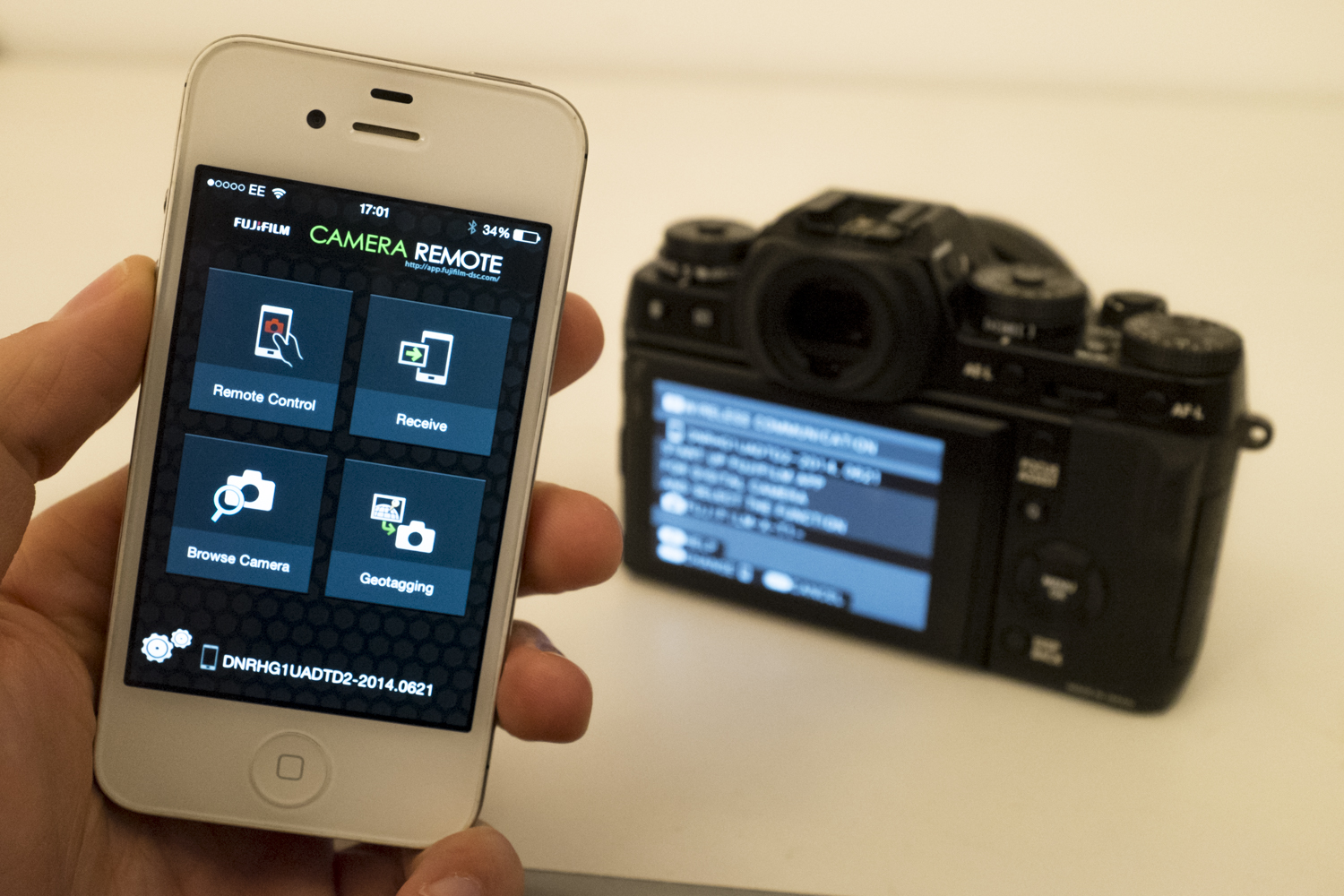
First and foremost, the WiFi function allows you to connect your camera with your phone or tablet and via the Fujifilm Camera Remote app you can download photos. This is really helpful if you enjoy using social media and want to upload photos while in the moment. A standout example of this is Paul Schlemmer, an X-Photographer who is constantly on the move, and often camping, but the lack of standard internet doesn’t stop him uploading photos to his brilliant Instagram account. This friendly digital nomad (and awesome beard wearer) is now uploading photos from his X100T to his phone and then to Instagram. This shows that the Fujifilm X-Series has the ability to keep your camera equipment size and weight down, it also has the ability to reduce your computer requirements to share your journey with others. As long as you’re happy with the JPEG presets available (you can’t download RAW files at the moment) then this is a lightweight travel solution. The bonus of only having the JPEGs available, is apart from the fact that the presets are wonderful, it prevents you from spending too long editing your photos, so you have more time to get out shooting.
But what if you want to share the moment with someone in person? Giving them a hard copy of an image. Well Fujifilm have created the Instax SP-1, a printer that turns your mobile device and/or camera into a modern, adapted version of a classic “polaroid camera”. You can send photos wirelessly via your camera (check compatibility) or mobile device to the printer that will then produce a print in a matter of seconds. The great Kevin Mullins used this at a wedding he was photographing and the couple burst into tears when Kevin handed them a print as he was leaving. Check out his review of the SP-1 here.
The Fujifilm Camera Remote app isn’t just about sending files to your mobile device. As the title suggests you can control your camera and effectively use your device as the camera’s viewfinder. To the more vain amongst us, this is brilliant for selfies.. Possibly the ultimate selfies?! I use this function a lot when testing out lighting for a portrait session before the subject turns up, cutting down the length of the shoot and the amount of their time I take up. It has also really helped me improve my understanding of lighting as I can experiment as much as I like without bothering the subject, as I’m the subject! I simply set the camera up on a tripod and use my phone to position myself correctly, as well as seeing the result and changing my lighting set up accordingly. The problem with this is you can often get carried away and pretend that you can pull off a good selfie!
At the other end of the vanity scale, I’ve used the wireless preview to photograph timid wildlife. By setting up the camera on a tripod in a location I know they will visit, I was able to retreat a bit to be less of a deterrent for the subject. In the adjacent picture I’m using the app with an X-T1 on a monopod to get closer to a puffin on a cliff edge (Photo courtesy of Duncan Jackson).
Zack Arias often takes advantage of the live preview on his phone for street photography. Check out this brilliant video of Zack exploring Marrakech and showing how he takes advantage of the app.
Finally, you can use the GPS tracking in your phone to automatically tag images with your geo-location. Great for helping you keep a record of where you’ve been. You simply connect the devices using the previously mentioned apps, syncronise the GPS location and then it will automatically update periodically as you move around.
Fujifilm has fully embraced WiFi technology to make wireless features and products that can really benefit a photographer, amateur and professional alike. With Fujifilm you can always expect improvements through firmware updates as well. The up and coming X-T1 upgrade has got some headline improvements already made public (check out my last blog on this). Who knows what Fujifilm will offer next to take advantage of mobile capabilities? What would you like to see?
The above image was taken with the X-T1 which had recently had a firmware update to make it compatible with the XF18-135mm lens which was used to obtain this shot, via the remote control feature and a monopod.
I remember when I first approached Fujifilm UK with the idea of testing their equipment in the jungles of Borneo. My intention was to rely on the X-Series to document my trip, which had a heavy focus on nature. Unfortunately at the time the X-Pro1 and X-E1 weren’t quite up to the speeds I required to use this system exclusively. If I had done this trip in 2014, oh how things would be different. Not purely because of the wonderful X-T1 but because of the firmware improvements made to the X-Pro1 and other cameras.
These firmware updates are so much more than simply updating cameras to optimise their usability with lenses launched more recently. If you look at this link you can see the timeline of improvements made to the X-Pro1, from large improvements like auto focus performance and better “single-hand” settings operability to extra functions being added like focus peaking for manual focusing. Below shows a screen grab with some of latest firmware updates for the X-Pro1.
It wasn’t just the flagship model which gained firmware upgrades; the X-E1 had much the same improvements and the X100 had an autofocus improvement that meant that it was in fact the ongoing firmware updates that were the most spoken about thing of this camera, instead of the previously poor autofocus. Further down the line, the X-E2 has had the refresh rate of its EVF improved to the very high standard of the X-T1. The X-A1 and X-M1 can now both wirelessly transfer pictures to the brilliant SP1 printer for near-instant prints.
Now the X-T1 is set for a major firmware update. The Internet has been buzzing with excitement around the new features that are integrated into the X100T and X-T1 graphite edition. Other than the wonderful 6-part creation of the graphite finish, this new version has some very exciting software improvements. The first headline feature is the new Classic Chrome JPEG film simulation that’s blowing everyone’s mind with its unique style that’s so different from the other film simulations available.
The second feature is the crazy electronic shutter toping out at 1/32000! For those of you using the fast prime lenses at F1.2 and F1.4, this opens up a huge realm of creativity. Only recently I had to juggle a neutral density filter between the XF23mm F1.4 and XF56mm F1.2 while exploring sunny Lisbon to take full advantage of the thin depth of field on offer. This new feature will make this a thing of the past, one less thing to have to worry about. The benefits of the electronic shutter don’t stop there – being electronic there are no moving parts to generate noise meaning it is truly silent shooting. This has always been one of the big factors that has made the X100s such a joy to use to quiet situations, a factor that often meant I would lean towards the X100s series instead of the X-T1.
Taken in the centre of Lisbon using an ND filter so I could use f1.2.
These aren’t the only updates to look forward to, as there are many many more features due to happen in a December firmware overhaul:
4-way controller AF selection
Changeable focus area during MF
Q menu customization
Interlocking AF and metering points
Unlocked AE-L/AF-L buttons
Direct selection of macro mode
Phase detection AF support for instant AF
Expansion of shutter speed in Program Shift mode
Manual shooting in video mode
New video frame rates
These all look like great improvements as the X-Series continues to evolve into an increasingly refined camera system, appealing to an increasingly wide genre. Notably for action/fast paced photography, the addition of the 4-way controller being able to move the AF point is very help for quickly adapting to situations instead of having to focus and recompose which can get annoying and frustrating with fleeting moments. The customisation of the Q menu is definitely a bonus, allowing photographers to really tailor the camera to their needs, prioritising the features that are most frequently used instead of constantly having to search through menus. I could go through and state the pluses of each new feature upgrade but this webpage explains them all.
These are the upgrades that Fujifilm have let us know in advance about, I can only imagine the other ‘goodies’ they have in store in the near future. Logically you would think that the X-E2 could potentially have remote shooting via phones or tablets like the X-T1 and X100T. Both the X-E2 and X-T1 might be able to wirelessly transfer pictures to the SP1 for wireless printing on the go. There are so many features that Fujifilm could add to the ever-increasing list of benefits for using the Fujifilm X-Series. I think the number 1 benefit on this list is that Fujifilm look after their current users, with upgrades such as this.
To look for the latest firmwares updates for your Fujifilm product search here.
This blog is going to try and cover the fundamentals of lenses, explaining when to use them and why. If you have any questions after reading this then please get in touch via:
I too took some photos at different focal lengths (see the below slideshow), between 10mm and 135mm, to emphasise how certain focal lengths are generally better than others for portraiture. This topic has brought up lots of comments and I have edited this part a number of times to try and get the best brief explanation, without going off on too big a tangent! To break it down to fundamentals, the thing that affects perspective is distance, the distance between the camera and the subject. The focal length you choose affects the framing of a subject. With the series of photos below, I tried to keep the framing the same for all the focal lengths; the thing that changed was the distance between the subject and me. At 10mm I was a mere few cm’s from the subject’s face (awkward), while at 135mm we were a few metres apart. This longest example (135mm) shows a flattening effect, where the content seems compressed. This occurs because of greater distance between the subject and myself. Making the depth of the face (e.g. from the nose to the ear) proportionally less compared to the distance between the subject and the lens… The opposite is true for the wide-angle photos. Take the 10mm example again; I am so close to the subject that the depth of the face makes up a larger distance than the distance between the lens and the nose, making the perspective exaggerated (also note how you can see the shadow behind the model with the wide-angle shots but you can’t with the telephoto portraits because of the narrower angle of view).
In full frame or 35mm film terminology, 50mm is deemed the ‘standard focal length’, as it is close to our eye’s central angle of view. This means that a 50mm lens produces a perspective very similar to what we see. Because the sensors in Fujifilm X-Series cameras are generally 1.5X smaller than full frame sensors (APS-C sensor size), this standard focal length equates to a 35mm lens, like the XF35mm F1.4 R. This is quite complicated to explain (it could be a whole other blog!)… So much so that I have spent hours editing these paragraphs, but hopefully you get the gist of how different focal lengths affect the perspective of a picture. There are some very informative comments about this topic at the bottom of this blog if you want to find out more.
Wide-angle lenses can create exaggerate perspectives which produce amusing (which is good as it’s engaging) portraits, especially with animals!
Now that we understand how different focal lengths and apertures affect the look of a picture we can look at how to combine the two. First of all lets think about portraits: If you want to isolate a subject generally you are going to want to use a standard or telephoto lens with a low F-stop, such as the XF35mm F1.4 R, XF56mm F1.2 R or the imminent XF50-140mm F2.8 R OIS WR. For the image to the left I wanted to try and isolate the woman from the background as it was very busy and distracting, and while it isn’t entirely clean it is made better as a result of using F1.4 for a shallow depth of field.
If you want to capture an environmental portrait generally you would use a wide-angle lens and depending on how much of the environment you want to make out in the background you’d range the F-stop between F2 and F11.
23mm f2
23mm f11
Both of the pictures above were taken with the X100s (I love using it for these kinds of photos). The left image is at F2 and while you can make out the room the clarity of it is poor. Compare that to the right image where the use of F11 results in the mountain behind the boarder being sharp.
Prime vs. Zoom
This is very much a personal preference, there is no right choice. It depends on lots of factors, from space and weight restrictions to financial limitations. Because prime lenses have a fixed focal length, they tend to be smaller, lighter and have larger minimum apertures (F1.2-2.8) compared to zoom lenses. While zoom lenses have the convenience of effectively including many different prime lenses, generally these have more restricted apertures (F2.8-5.6). For me, it depends on the situation. I prefer prime lenses because of the greater depth of field control. As well as this I believe that the fixed focal length makes you think more about your photography, particularly composition. However, the convenience of zoom lenses in situations that are changing quickly can be invaluable as you don’t have to change lenses as often to obtain a variety of photographs. When conditions are unpleasant this is vital in order to protect the sensor. A point to consider is that the XF18-135mm F3.5-5.6 R LM OIS WR plus the recently released XF50-140mm F2.8 and XF16-55mm F2.8 R WR (hopefully arriving in the first quarter of 2015) are all weather sealed making them ideal partners for the X-T1, creating a weather sealed system.
If I am working in relatively controlled conditions where it is easy for me to change lens regularly then I try to use prime lenses.
But if conditions are not suitable for continuous lens changes or a situation is quickly evolving and I need to be on my toes the zoom lenses are what I grab.
The zoom lens examples above are all wildlife examples (which are often taken in difficult conditions where a situation is quickly changing) were captured with the telephoto half of the XF18-135mm F3.5-5.6 R LM OIS WR. The reason why I chose these examples is because I wanted to show what can be done with F5.6 as the maximum aperture, showing nice bokeh in the images where I’ve tried to keep the attention on the subject. Now imagine what will be possible with the new XF50-140mm F2.8 R OIS WR! Can you tell I’m a bit excited about it…?
What lens for the occasion?
The main reason I first moved to the Fujifilm X-Series was the prioritisation of high quality lenses. With the announcement of the X-Pro1, the first lenses available were the XF18mm F2 R, XF35mm F1.4 R and XF60mm F2.4 R. These are all high quality, lightweight prime lenses that, together, offer a wide focal length range package. From there the lens road map laid out Fujifilm’s intentions to create a strong lens collection covering a wide range of uses.
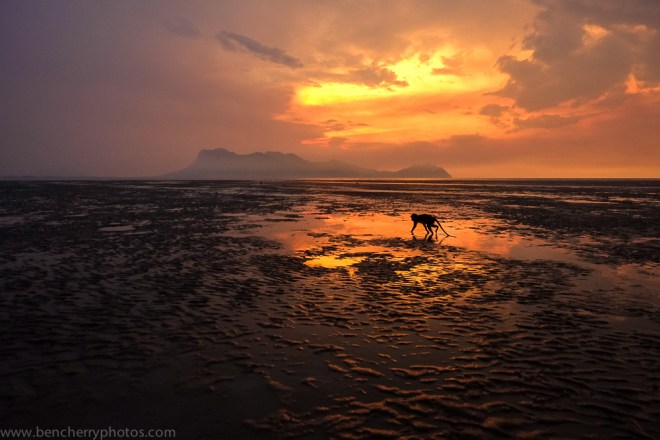
Generally lenses are associated with a particular genre of photography based on their focal length. For example wide lenses such as the XF14mm F2.8 R and XF10-24mm F4 R OIS are intended for landscapes and long lenses like the XF55-200mm F3.5-4.8 R LM OIS are for wildlife and sports. But rules are made to be broken and your lenses don’t necessarily have to be used to fit those stereotypes. The photograph below was taken with the 14mm lens, generally intended for landscape photography, however I used this lens to capture this macaque foraging for stranded marine life amidst a sunset scene.
14mm – Foraging macaque
The important thing to remember with your lens choice is to think “what do I want to convey?” On this occasion I wanted to show the scene as a whole. In the landscape shot below I focused on the distant hills over a bay with the setting sun using the 55-200mm lens, which is usually associated with wildlife and sports. This helped to emphasise the golden glow which wasn’t as prevalent with a wider-angle view.
120mm – Landscape
Conclusion
Hopefully you now understand that lens choice can have a huge impact on your end result. If you understand the principles of focal lengths and apertures then you have a grasp on what lens to use and why. Remember that lenses are tools designed to help fuel your creativity. For me, a lens that I am very much looking forward to is the XF50-140mm F2.8 R OIS WR. This lens offers the versatility of a zoom but with a constant aperture of F2.8 it gives very good depth of field control. A lens such as this has many uses and I’m sure it is going to be a big hit with photographers from all genres.
A good exercise to try would be to force yourself to use one focal length next time you go for a walk. No matter if you’re using a prime or a zoom lens, try and restrict yourself. The purpose of this is to understand what you can capture with certain focal lengths so that in the future you will hopefully be more decisive with what focal length to use in a given situation. Remember that you can change the end picture dramatically through different apertures. Why not give it a go and then share with us the variety of photographs you managed to capture with the same focal length. Or you can change it up and use one aperture but change your focal lengths. Share your results with us and if you have any questions please get in touch via the contact details at the top.


 100% close up – In my eyes the noise (or lack of it) is not a problem at ISO 1600


 First and foremost, the WiFi function allows you to connect your camera with your phone or tablet and via the Fujifilm Camera Remote app you can download photos. This is really helpful if you enjoy using social media and want to upload photos while in the moment. A standout example of this is Paul Schlemmer, an X-Photographer who is constantly on the move, and often camping, but the lack of standard internet doesn’t stop him uploading photos to
  The Fujifilm Camera Remote app isn’t just about sending files to your mobile device. As the title suggests you can control your camera and effectively use your device as the camera’s viewfinder. To the more vain amongst us, this is brilliant for selfies.. Possibly the ultimate selfies?! I use this function a lot when testing out lighting for a portrait session before the subject turns up, cutting down the length of the shoot and the amount of their time I take up. It has also really helped me improve my understanding of lighting as I can experiment as much as I like without bothering the subject, as I’m the subject! I simply set the camera up on a tripod and use my phone to position myself correctly, as well as seeing the result and changing my lighting set up accordingly. The problem with this is you can often get carried away and pretend that you can pull off a good selfie!
 At the other end of the vanity scale, I’ve used the wireless preview to photograph timid wildlife. By setting up the camera on a tripod in a location I know they will visit, I was able to retreat a bit to be less of a deterrent for the subject. In the adjacent picture I’m using the app with an X-T1 on a monopod to get closer to a puffin on a cliff edge (Photo courtesy of Duncan Jackson).